> ## Documentation Index
> Fetch the complete documentation index at: https://www.greptile.com/docs/llms.txt
> Use this file to discover all available pages before exploring further.
# Auto-approve PRs
> Let Greptile approve low-risk, bug-free PRs after a clean 5/5 review.
Auto-approve lets Greptile approve pull requests that it rates as low-risk and bug-free.
It only approves PRs with a clean **5/5 Greptile review**. You choose the maximum risk level Greptile can approve, and you can add filters to keep certain PRs out of auto-approval.
Auto-approve is in beta. We recommend using it only for low-risk changes, not as a universal rule for every PR.
### Configure auto-approve
On the [Greptile dashboard](https://app.greptile.com/review#auto-approve), go to **Code Review Settings -> Auto-approve**.
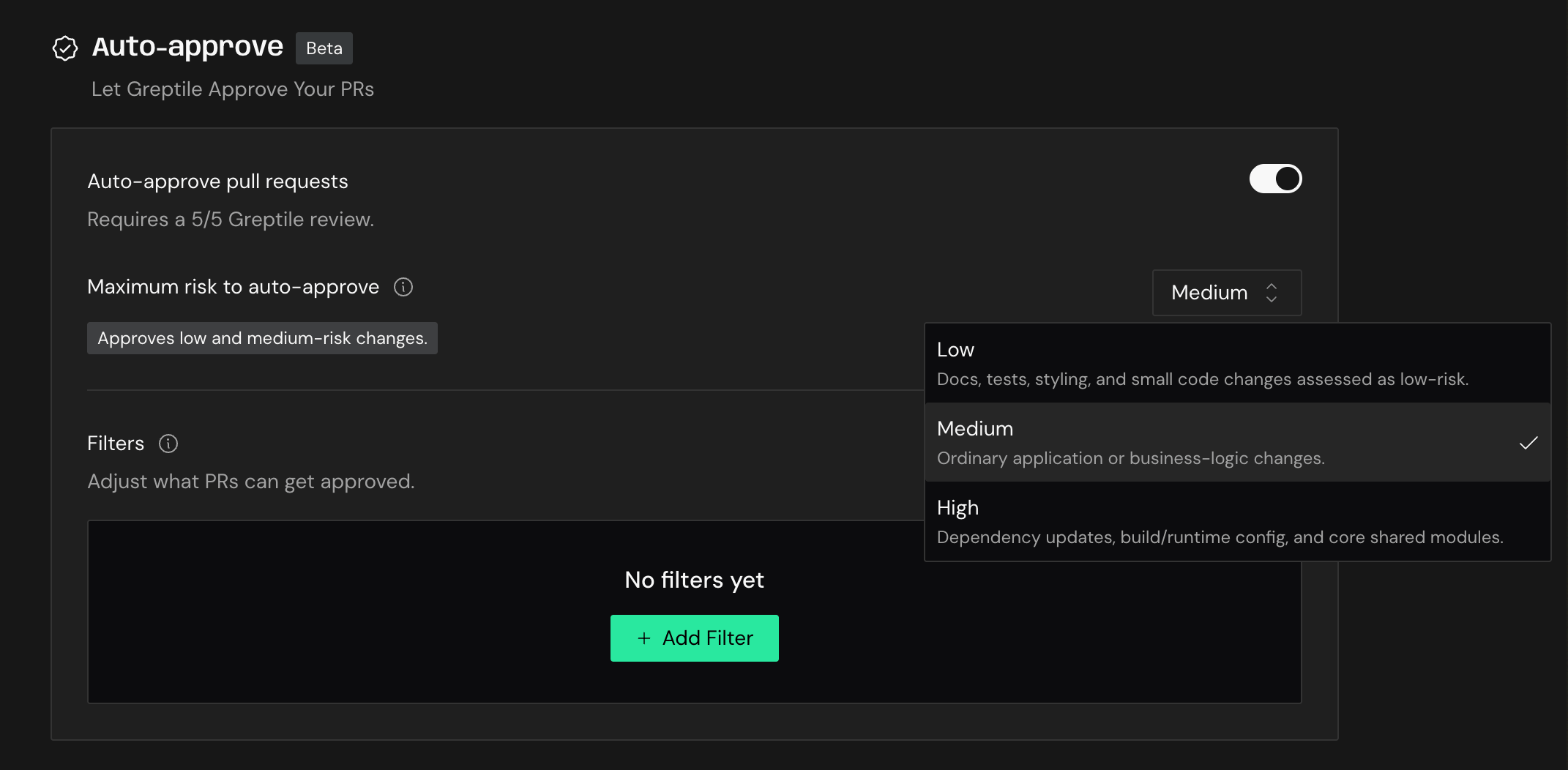 Turn on **Auto-approve pull requests**.
Choose the highest risk level Greptile is allowed to approve. Greptile only auto-approves PRs at or below this level.
Use **Low** for docs, tests, styling, and small code changes. Use higher levels only when you are comfortable with Greptile approving those changes without another human review. Critical-risk changes are never auto-approved.
Add filters for labels, branches, files, or authors that should never be auto-approved. Add per-repo filters in your `.greptile` file.
Auto-approval still requires a clean 5/5 Greptile review. If Greptile finds an issue, or the PR does not meet the configured risk threshold, it will not approve the PR.
### How risk levels work
The risk level controls the broadest class of changes Greptile can approve.
* **Low**: docs, tests, styling, and small code changes assessed as low-risk
* **Medium**: ordinary application or business-logic changes
* **High**: dependency updates, build or runtime config, and core shared modules
Greptile never auto-approves critical-risk changes, including changes to auth, secrets, billing, database migrations, infra or CI, and public APIs.
Start with **Low**. Raise the maximum risk only after your team has seen enough auto-approved PRs to trust the behavior for that class of change.
### Filters
Filters let you exclude PRs from auto-approval even when Greptile rates them as safe.
Use filters for changes that need a human reviewer every time, such as:
* Sensitive branches
* Release or migration labels
* Critical files or directories
* Authors whose PRs need extra review
Add per-repo filters in your `.greptile` file.
### When to use it
Auto-approve is useful when the cost of waiting for a human review is higher than the risk of the change. Good candidates include docs updates, test-only changes, formatting, and small changes Greptile rates as low-risk.
Do not enable it broadly across all PRs. It is meant to save time on low-risk changes while keeping normal review paths for everything else.
Turn on **Auto-approve pull requests**.
Choose the highest risk level Greptile is allowed to approve. Greptile only auto-approves PRs at or below this level.
Use **Low** for docs, tests, styling, and small code changes. Use higher levels only when you are comfortable with Greptile approving those changes without another human review. Critical-risk changes are never auto-approved.
Add filters for labels, branches, files, or authors that should never be auto-approved. Add per-repo filters in your `.greptile` file.
Auto-approval still requires a clean 5/5 Greptile review. If Greptile finds an issue, or the PR does not meet the configured risk threshold, it will not approve the PR.
### How risk levels work
The risk level controls the broadest class of changes Greptile can approve.
* **Low**: docs, tests, styling, and small code changes assessed as low-risk
* **Medium**: ordinary application or business-logic changes
* **High**: dependency updates, build or runtime config, and core shared modules
Greptile never auto-approves critical-risk changes, including changes to auth, secrets, billing, database migrations, infra or CI, and public APIs.
Start with **Low**. Raise the maximum risk only after your team has seen enough auto-approved PRs to trust the behavior for that class of change.
### Filters
Filters let you exclude PRs from auto-approval even when Greptile rates them as safe.
Use filters for changes that need a human reviewer every time, such as:
* Sensitive branches
* Release or migration labels
* Critical files or directories
* Authors whose PRs need extra review
Add per-repo filters in your `.greptile` file.
### When to use it
Auto-approve is useful when the cost of waiting for a human review is higher than the risk of the change. Good candidates include docs updates, test-only changes, formatting, and small changes Greptile rates as low-risk.
Do not enable it broadly across all PRs. It is meant to save time on low-risk changes while keeping normal review paths for everything else.