> ## Documentation Index
> Fetch the complete documentation index at: https://www.greptile.com/docs/llms.txt
> Use this file to discover all available pages before exploring further.
# Custom Standards & Rules
> Create custom rules, upload style guides, and configure repository-specific standards via greptile.json. Enforce your team's coding practices automatically.
Configure Greptile to enforce your team's unique standards, from simple naming conventions to complex architectural patterns. This guide covers all configuration methods and when to use each.
**After this guide, you can:**
* Create custom rules that catch team-specific issues
* Upload existing style guides for automatic enforcement
* Configure repository-specific standards via `.greptile/` or `greptile.json`
* Use per-directory rules in monorepos
* Verify rules are actually being applied
* Debug when rules don't work as expected
## Required Permissions
Understand who can configure custom standards:
| Action | Organization admin | Team admin | Member |
| ------------------------------------------------ | ------------------------------------------------------------------- | ---------- | ------ |
| View custom context | ✅ | ✅ | ✅ |
| Create/edit dashboard rules (organization scope) | ✅ | — | ❌ |
| Create/edit dashboard rules (team scope) | ✅ | ✅ | ❌ |
| Delete dashboard rules (organization scope) | ✅ | — | ❌ |
| Delete dashboard rules (team scope) | ✅ | ✅ | ❌ |
| Edit `.greptile/` or `greptile.json` | Anyone with repository write access (not a Greptile dashboard role) | Same | Same |
| View suggested rules | ✅ | ✅ | ✅ |
| Approve suggested rules | ✅ | ✅ | ❌ |
| Delete organization | ✅ | — | ❌ |
Dashboard rule permissions depend on where you are in the app. At organization scope, only an **organization admin** can create or edit rules. Inside a team, an **organization admin** or **team admin** for that team can. If buttons are disabled, ask an organization admin to promote you—or, for team-scoped rules only, to grant you team admin on that team.
## Configuration Methods
| Method | Best For | Version Control | Scope |
| ----------------------- | ------------------------------------ | --------------- | ---------------------------- |
| **`.greptile/` folder** | Production standards, monorepos | Yes | Per-directory with cascading |
| **`greptile.json`** | Simple repos, single-file config | Yes | Repository-wide |
| **Dashboard** | Quick experiments, org-wide defaults | No | All repos or specific ones |
Dashboard and repo-level configs (`.greptile/` or `greptile.json`) are **separate systems**. Rules in config files don't appear in the dashboard. When both exist, repo-level config takes priority. If both `.greptile/` and `greptile.json` exist, `.greptile/` wins.
## Method 1: Dashboard
The quickest way to add custom rules. Changes apply within 2-3 minutes to new PRs.
Click **Custom Context** in the sidebar. Available at both the organization and team level.
Rules must be specific and measurable:
* ❌ "Write clean code"
* ✅ "Functions must not exceed 50 lines"
* ✅ "All API responses must include `status` and `timestamp` fields"
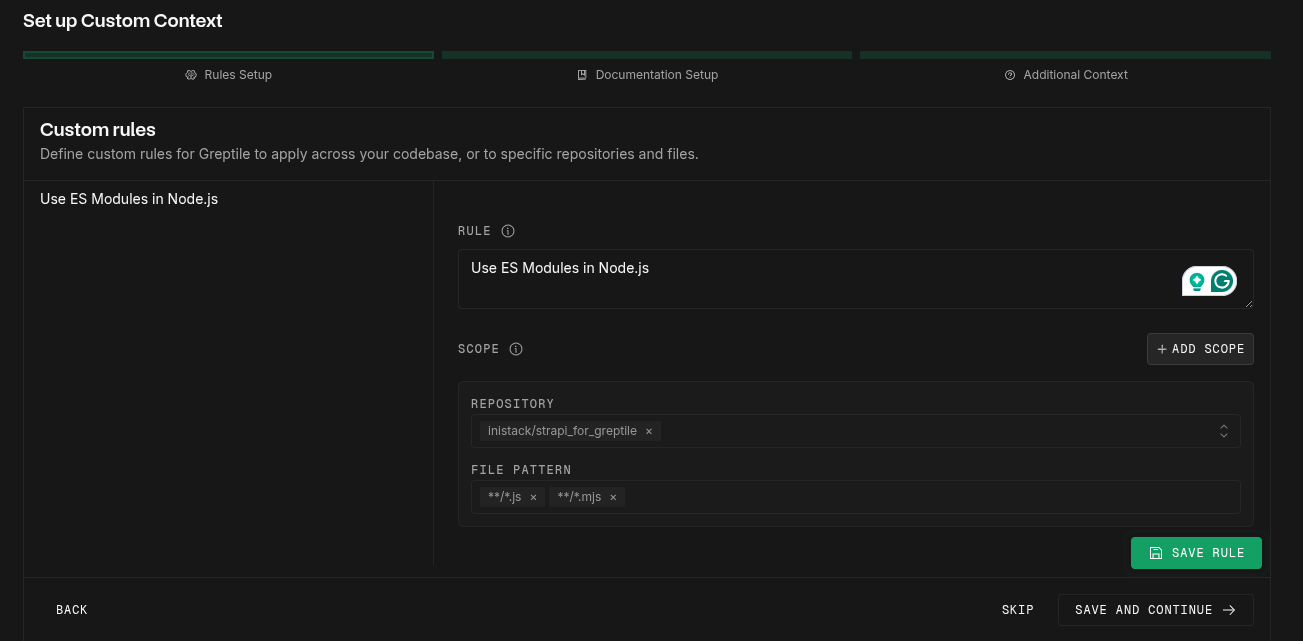 Use glob patterns to target specific files:
```text theme={}
src/**/*.ts # All TypeScript in src
**/*.test.{js,ts} # All test files
```
Point to existing documentation in your repository:
```text theme={}
docs/style-guide.md
./CONTRIBUTING.md
```
Use glob patterns to target specific files:
```text theme={}
src/**/*.ts # All TypeScript in src
**/*.test.{js,ts} # All test files
```
Point to existing documentation in your repository:
```text theme={}
docs/style-guide.md
./CONTRIBUTING.md
```
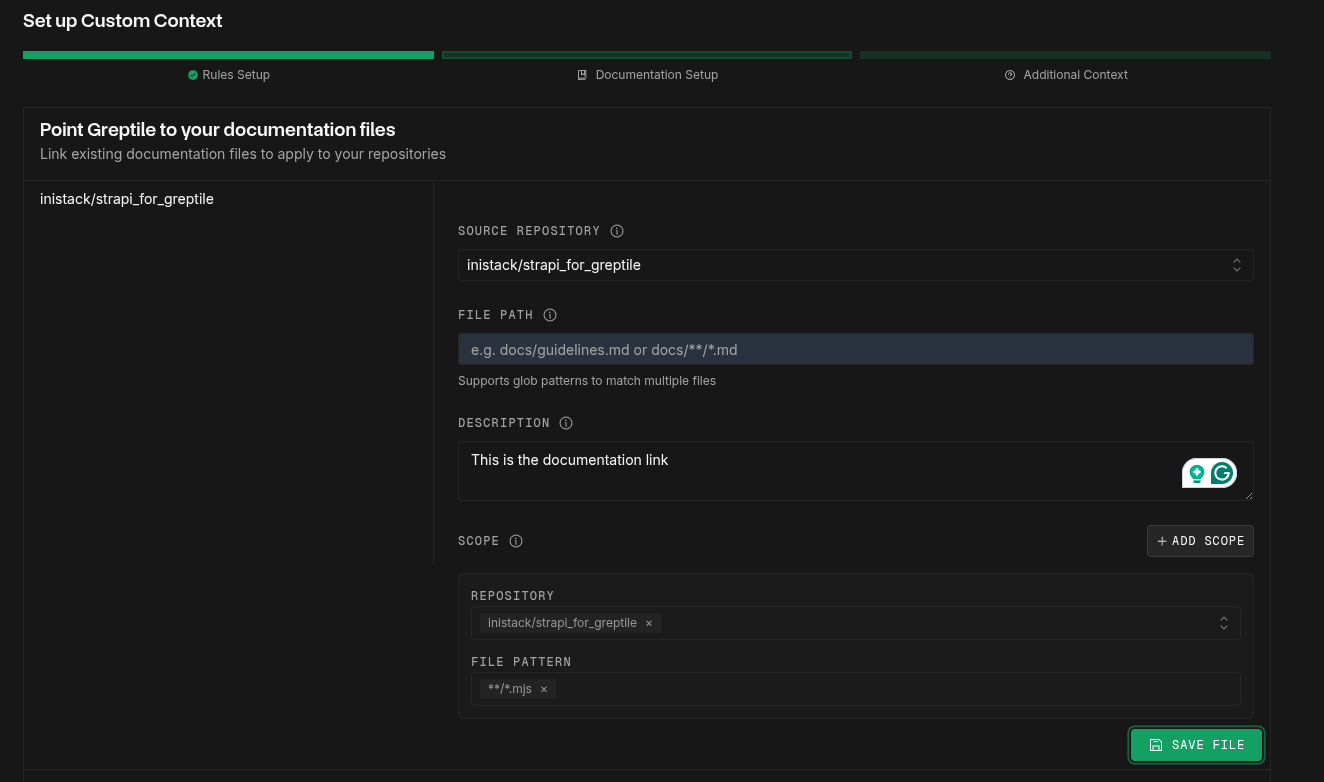 Supported formats: Markdown, plain text, YAML, JSON
1. Create a test PR with intentional violations
2. Verify Greptile catches them within 2-3 minutes
3. Check "Last Applied" timestamp updates
## Method 2: .greptile/ Folder (Recommended)
The `.greptile/` folder gives you version-controlled rules with per-directory overrides — ideal for monorepos and teams that want rules reviewed in PRs.
You have two options for defining rules: structured JSON rules in `config.json`, or free-form markdown in `rules.md`. Use both in the same folder if you want.
### Structured Rules (config.json)
Each rule has a `rule` string, plus optional `scope`, `severity`, and `id` fields:
```json .greptile/config.json theme={}
{
"rules": [
{
"id": "no-raw-sql",
"rule": "Use parameterized queries. Never interpolate user input into SQL strings.",
"scope": ["src/db/**"],
"severity": "high"
},
{
"rule": "All API endpoints must have rate limiting",
"scope": ["src/api/**/*.ts"],
"severity": "medium"
}
]
}
```
The `id` field matters if a child directory needs to disable the rule — see [Disabling Inherited Rules](/code-review/greptile-config#disabling-inherited-rules).
### Markdown Rules (rules.md)
For rules that benefit from prose, examples, or code blocks, use `rules.md`:
```markdown .greptile/rules.md theme={}
## Error Handling
All async functions must use try-catch blocks. Never swallow errors silently —
at minimum, log them with the error context.
## Naming Conventions
Use camelCase for variables and functions, PascalCase for classes and types.
```
The entire file is passed to the reviewer as context, scoped to the directory containing the `.greptile/` folder.
### Context Files (files.json)
Point the reviewer to existing files it should read — database schemas, API specs, architecture docs:
```json .greptile/files.json theme={}
{
"files": [
{
"path": "docs/architecture.md",
"description": "System architecture guidelines"
},
{
"path": "prisma/schema.prisma",
"description": "Database schema — reference for model relationships",
"scope": ["src/db/**"]
}
]
}
```
Paths are relative to the directory containing the `.greptile/` folder, not the repo root.
For the complete schema, see [.greptile/ File Reference](/code-review/greptile-config-reference). For how cascading and per-directory overrides work, see [.greptile/ Configuration](/code-review/greptile-config).
## Method 3: greptile.json
A single JSON file for repository-wide configuration. Good for simpler repos that don't need per-directory overrides.
### Understanding customContext Types
The `customContext` field in greptile.json accepts three arrays:
**1. `rules` - Specific coding standards to enforce**
```json theme={}
"rules": [
{
"rule": "Use async/await instead of callbacks",
"scope": ["**/*.js", "**/*.ts"] // Optional: limit to specific files
},
{
"rule": "All API endpoints must have rate limiting",
"scope": ["src/api/**"]
}
]
```
**2. `files` - Reference existing documentation**
```json theme={}
"files": [
{
"path": "docs/style-guide.md", // Path to file in your repo
"description": "Company coding standards", // Optional description
"scope": ["src/**"] // Optional: where to apply this file's rules
}
]
```
**3. `other` - General context and background information**
```json theme={}
"other": [
{
"content": "This is legacy code from 2018 - be careful with changes",
"scope": ["src/legacy/**"]
},
{
"content": "We're migrating to TypeScript - prefer TS over JS"
}
]
```
Each type supports optional `scope` patterns using glob syntax to target specific files or directories. If no scope is specified, the context applies to all files.
### Complete Configuration Examples
```json theme={}
{
"customContext": {
"rules": [
{
"rule": "Use dependency injection for all services",
"scope": ["src/services/**/*.ts"]
},
{
"rule": "API endpoints must have rate limiting",
"scope": ["**/api/**/*.ts"]
},
{
"rule": "Test files must use .test.ts extension",
"scope": ["src/**/*"]
}
]
}
}
```
```json theme={}
{
// Review behavior
"strictness": 2,
"commentTypes": ["logic", "syntax", "style", "info"],
// Custom standards
"customContext": {
"rules": [
{
"rule": "No direct database queries in controllers",
"scope": ["src/controllers/**/*.ts"]
}
],
"files": [
{
"path": "docs/architecture.md",
"description": "System architecture guidelines"
}
]
},
// Pattern repositories (cross-repo context)
"patternRepositories": ["company/shared-standards"],
// Ignore patterns (newline-separated string)
"ignorePatterns": "*.generated.*\n**/vendor/**\n**/__snapshots__/**"
}
```
## Verifying Rules Are Active
Many teams report rules "not working" - here's how to verify:
**Dashboard → Custom Context → Rules tab**
Supported formats: Markdown, plain text, YAML, JSON
1. Create a test PR with intentional violations
2. Verify Greptile catches them within 2-3 minutes
3. Check "Last Applied" timestamp updates
## Method 2: .greptile/ Folder (Recommended)
The `.greptile/` folder gives you version-controlled rules with per-directory overrides — ideal for monorepos and teams that want rules reviewed in PRs.
You have two options for defining rules: structured JSON rules in `config.json`, or free-form markdown in `rules.md`. Use both in the same folder if you want.
### Structured Rules (config.json)
Each rule has a `rule` string, plus optional `scope`, `severity`, and `id` fields:
```json .greptile/config.json theme={}
{
"rules": [
{
"id": "no-raw-sql",
"rule": "Use parameterized queries. Never interpolate user input into SQL strings.",
"scope": ["src/db/**"],
"severity": "high"
},
{
"rule": "All API endpoints must have rate limiting",
"scope": ["src/api/**/*.ts"],
"severity": "medium"
}
]
}
```
The `id` field matters if a child directory needs to disable the rule — see [Disabling Inherited Rules](/code-review/greptile-config#disabling-inherited-rules).
### Markdown Rules (rules.md)
For rules that benefit from prose, examples, or code blocks, use `rules.md`:
```markdown .greptile/rules.md theme={}
## Error Handling
All async functions must use try-catch blocks. Never swallow errors silently —
at minimum, log them with the error context.
## Naming Conventions
Use camelCase for variables and functions, PascalCase for classes and types.
```
The entire file is passed to the reviewer as context, scoped to the directory containing the `.greptile/` folder.
### Context Files (files.json)
Point the reviewer to existing files it should read — database schemas, API specs, architecture docs:
```json .greptile/files.json theme={}
{
"files": [
{
"path": "docs/architecture.md",
"description": "System architecture guidelines"
},
{
"path": "prisma/schema.prisma",
"description": "Database schema — reference for model relationships",
"scope": ["src/db/**"]
}
]
}
```
Paths are relative to the directory containing the `.greptile/` folder, not the repo root.
For the complete schema, see [.greptile/ File Reference](/code-review/greptile-config-reference). For how cascading and per-directory overrides work, see [.greptile/ Configuration](/code-review/greptile-config).
## Method 3: greptile.json
A single JSON file for repository-wide configuration. Good for simpler repos that don't need per-directory overrides.
### Understanding customContext Types
The `customContext` field in greptile.json accepts three arrays:
**1. `rules` - Specific coding standards to enforce**
```json theme={}
"rules": [
{
"rule": "Use async/await instead of callbacks",
"scope": ["**/*.js", "**/*.ts"] // Optional: limit to specific files
},
{
"rule": "All API endpoints must have rate limiting",
"scope": ["src/api/**"]
}
]
```
**2. `files` - Reference existing documentation**
```json theme={}
"files": [
{
"path": "docs/style-guide.md", // Path to file in your repo
"description": "Company coding standards", // Optional description
"scope": ["src/**"] // Optional: where to apply this file's rules
}
]
```
**3. `other` - General context and background information**
```json theme={}
"other": [
{
"content": "This is legacy code from 2018 - be careful with changes",
"scope": ["src/legacy/**"]
},
{
"content": "We're migrating to TypeScript - prefer TS over JS"
}
]
```
Each type supports optional `scope` patterns using glob syntax to target specific files or directories. If no scope is specified, the context applies to all files.
### Complete Configuration Examples
```json theme={}
{
"customContext": {
"rules": [
{
"rule": "Use dependency injection for all services",
"scope": ["src/services/**/*.ts"]
},
{
"rule": "API endpoints must have rate limiting",
"scope": ["**/api/**/*.ts"]
},
{
"rule": "Test files must use .test.ts extension",
"scope": ["src/**/*"]
}
]
}
}
```
```json theme={}
{
// Review behavior
"strictness": 2,
"commentTypes": ["logic", "syntax", "style", "info"],
// Custom standards
"customContext": {
"rules": [
{
"rule": "No direct database queries in controllers",
"scope": ["src/controllers/**/*.ts"]
}
],
"files": [
{
"path": "docs/architecture.md",
"description": "System architecture guidelines"
}
]
},
// Pattern repositories (cross-repo context)
"patternRepositories": ["company/shared-standards"],
// Ignore patterns (newline-separated string)
"ignorePatterns": "*.generated.*\n**/vendor/**\n**/__snapshots__/**"
}
```
## Verifying Rules Are Active
Many teams report rules "not working" - here's how to verify:
**Dashboard → Custom Context → Rules tab**
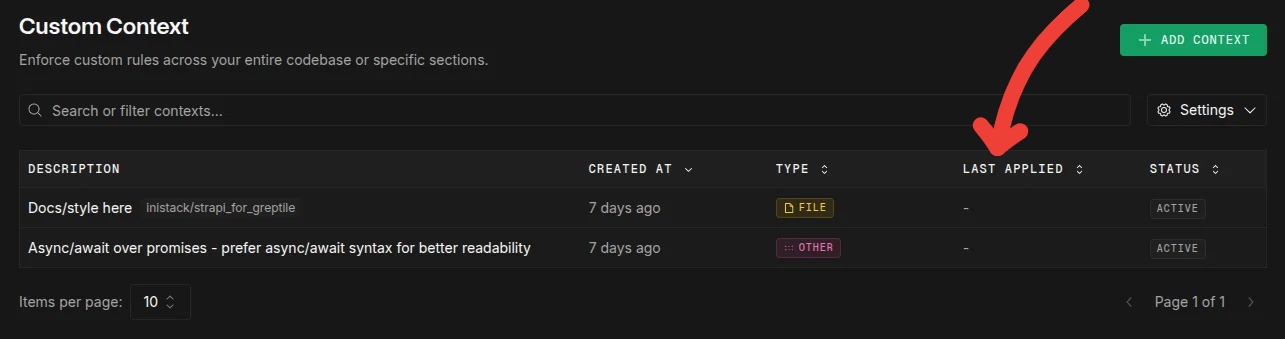 Last Applied Status
Look for "Last Applied" timestamp:
* Should update within 2-3 minutes of adding rule
* If stuck on "Never", repository may not be indexed
* Force refresh: Create PR with `@greptileai review`
**Dashboard → Repositories → Your Repo**
Last Applied Status
Look for "Last Applied" timestamp:
* Should update within 2-3 minutes of adding rule
* If stuck on "Never", repository may not be indexed
* Force refresh: Create PR with `@greptileai review`
**Dashboard → Repositories → Your Repo**
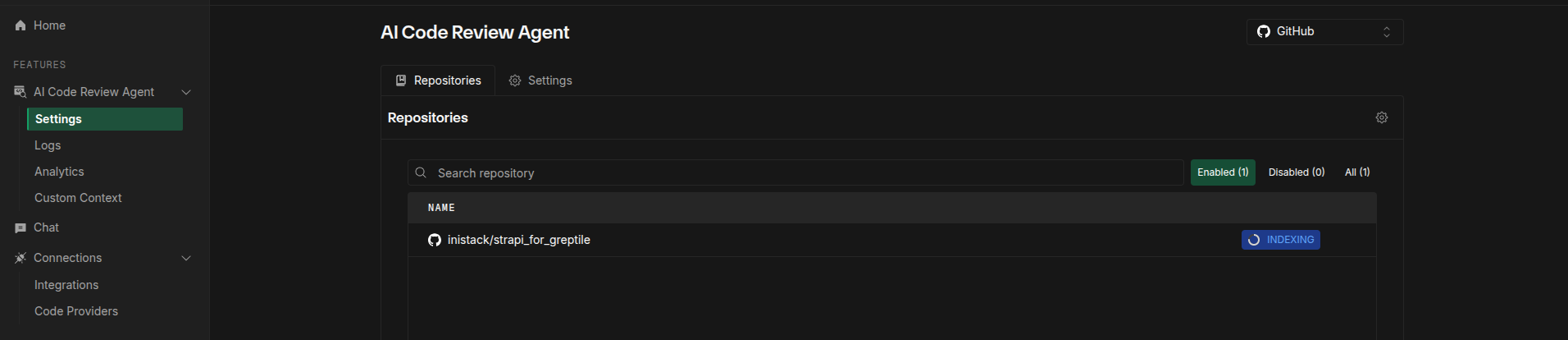 Greptile Repo Indexing
Add test rule with obvious violation:
```json theme={}
{
"rule": "No TODO comments",
"scope": ["**/*.js"]
}
```
Create PR with `// TODO: test` and verify detection.
## Suggested Rules (Auto-Learning)
Greptile automatically suggests rules based on your team's patterns:
**How it works:**
1. After \~10 PRs, Greptile detects consistent patterns
2. You can approve, modify, or ignore suggestions
3. Duplicates may appear (safe to ignore)
Suggested rules may duplicate existing ones. This is a known issue - just mark as ignored.
## Troubleshooting Custom Rules
1. **Check "Last Applied" timestamp** (Custom Context in the sidebar)
* If "Never": Repository not indexed or rule not triggered
* If old: Rule may be inactive
2. **Verify repository is indexed** (navigate to your team, then Repositories)
* Status must be "Indexed" not "Indexing" or "Failed"
3. **For `.greptile/` or `greptile.json` rules:**
* Validate JSON syntax
* Rules won't show in dashboard (this is expected)
* Takes effect on next PR only
4. **Force trigger:** Comment `@greptileai review this`
This is expected behavior:
* Dashboard and repo-level configs (`.greptile/` or `greptile.json`) are separate systems
* Repo-level rules apply during review but don't show in dashboard
* Dashboard rules don't generate config files
* You can use both, but repo-level config takes priority
❌ **Wrong - comma-separated string:**
```json theme={}
{
"scope": "**/*.cpp, **/*.hpp"
}
```
✅ **Correct - array of patterns:**
```json theme={}
{
"scope": ["**/*.cpp", "**/*.hpp"]
}
```
`ignorePatterns` only affects reviews, NOT indexing. Files will still be indexed.
**Bad:** "Follow best practices"
**Good:** "Variable names must be camelCase, min 3 characters, no Hungarian notation"
Include examples in your rule for best results:
```json theme={}
{
"rule": "API error responses must include: status (number), message (string), timestamp (ISO 8601), requestId (UUID)",
"scope": ["**/api/**"]
}
```
## What's Next?
* [.greptile/ Configuration →](/code-review/greptile-config) - Cascading config with per-directory overrides
* [.greptile/ File Reference →](/code-review/greptile-config-reference) - Complete schema for config.json, rules.md, files.json
* [Pattern Repositories →](/code-review/pattern-repositories) - Share rules across repositories
* [greptile.json Reference →](/code-review/greptile-json-reference) - Legacy format configuration options
Greptile Repo Indexing
Add test rule with obvious violation:
```json theme={}
{
"rule": "No TODO comments",
"scope": ["**/*.js"]
}
```
Create PR with `// TODO: test` and verify detection.
## Suggested Rules (Auto-Learning)
Greptile automatically suggests rules based on your team's patterns:
**How it works:**
1. After \~10 PRs, Greptile detects consistent patterns
2. You can approve, modify, or ignore suggestions
3. Duplicates may appear (safe to ignore)
Suggested rules may duplicate existing ones. This is a known issue - just mark as ignored.
## Troubleshooting Custom Rules
1. **Check "Last Applied" timestamp** (Custom Context in the sidebar)
* If "Never": Repository not indexed or rule not triggered
* If old: Rule may be inactive
2. **Verify repository is indexed** (navigate to your team, then Repositories)
* Status must be "Indexed" not "Indexing" or "Failed"
3. **For `.greptile/` or `greptile.json` rules:**
* Validate JSON syntax
* Rules won't show in dashboard (this is expected)
* Takes effect on next PR only
4. **Force trigger:** Comment `@greptileai review this`
This is expected behavior:
* Dashboard and repo-level configs (`.greptile/` or `greptile.json`) are separate systems
* Repo-level rules apply during review but don't show in dashboard
* Dashboard rules don't generate config files
* You can use both, but repo-level config takes priority
❌ **Wrong - comma-separated string:**
```json theme={}
{
"scope": "**/*.cpp, **/*.hpp"
}
```
✅ **Correct - array of patterns:**
```json theme={}
{
"scope": ["**/*.cpp", "**/*.hpp"]
}
```
`ignorePatterns` only affects reviews, NOT indexing. Files will still be indexed.
**Bad:** "Follow best practices"
**Good:** "Variable names must be camelCase, min 3 characters, no Hungarian notation"
Include examples in your rule for best results:
```json theme={}
{
"rule": "API error responses must include: status (number), message (string), timestamp (ISO 8601), requestId (UUID)",
"scope": ["**/api/**"]
}
```
## What's Next?
* [.greptile/ Configuration →](/code-review/greptile-config) - Cascading config with per-directory overrides
* [.greptile/ File Reference →](/code-review/greptile-config-reference) - Complete schema for config.json, rules.md, files.json
* [Pattern Repositories →](/code-review/pattern-repositories) - Share rules across repositories
* [greptile.json Reference →](/code-review/greptile-json-reference) - Legacy format configuration options