> ## Documentation Index
> Fetch the complete documentation index at: https://www.greptile.com/docs/llms.txt
> Use this file to discover all available pages before exploring further.
# Greptile CLI
> Trigger local code reviews from your terminal.
Use the Greptile CLI to run local code reviews from your terminal. This page covers Greptile CLI v3.0.1.
Review your current branch against its base branch, resume unfinished reviews, and reopen past reviews without leaving your shell.
## Install
Install the CLI:
```bash theme={}
npm i -g greptile
```
Check that the command works:
```bash theme={}
greptile --version
```
## Prerequisites
* Sign up for a [Greptile account](https://app.greptile.com/)
* A local Git repository with commits to review
## Sign in
Authenticate once on each device:
```bash theme={}
greptile login
```
Check the signed-in account and org membership:
```bash theme={}
greptile whoami
```
To sign out:
```bash theme={}
greptile logout
```
## Review a branch
Checkout to the branch you're working in and run a review from the repository root:
```bash theme={}
git checkout new-feature
greptile review
```
By default, Greptile compares your current branch against the repository’s default branch, usually `main`, and reviews the unmerged commits on the current branch.
Uncommitted changes are ignored.
**Set the base branch explicitly** and Greptile will compare current branch with this branch and review the unmerged commits:
```bash theme={}
greptile review -b main
```
Resume the latest unfinished review:
```bash theme={}
greptile review --resume
```
Show findings inline with the relevant code:
```bash theme={}
greptile review --diff
```
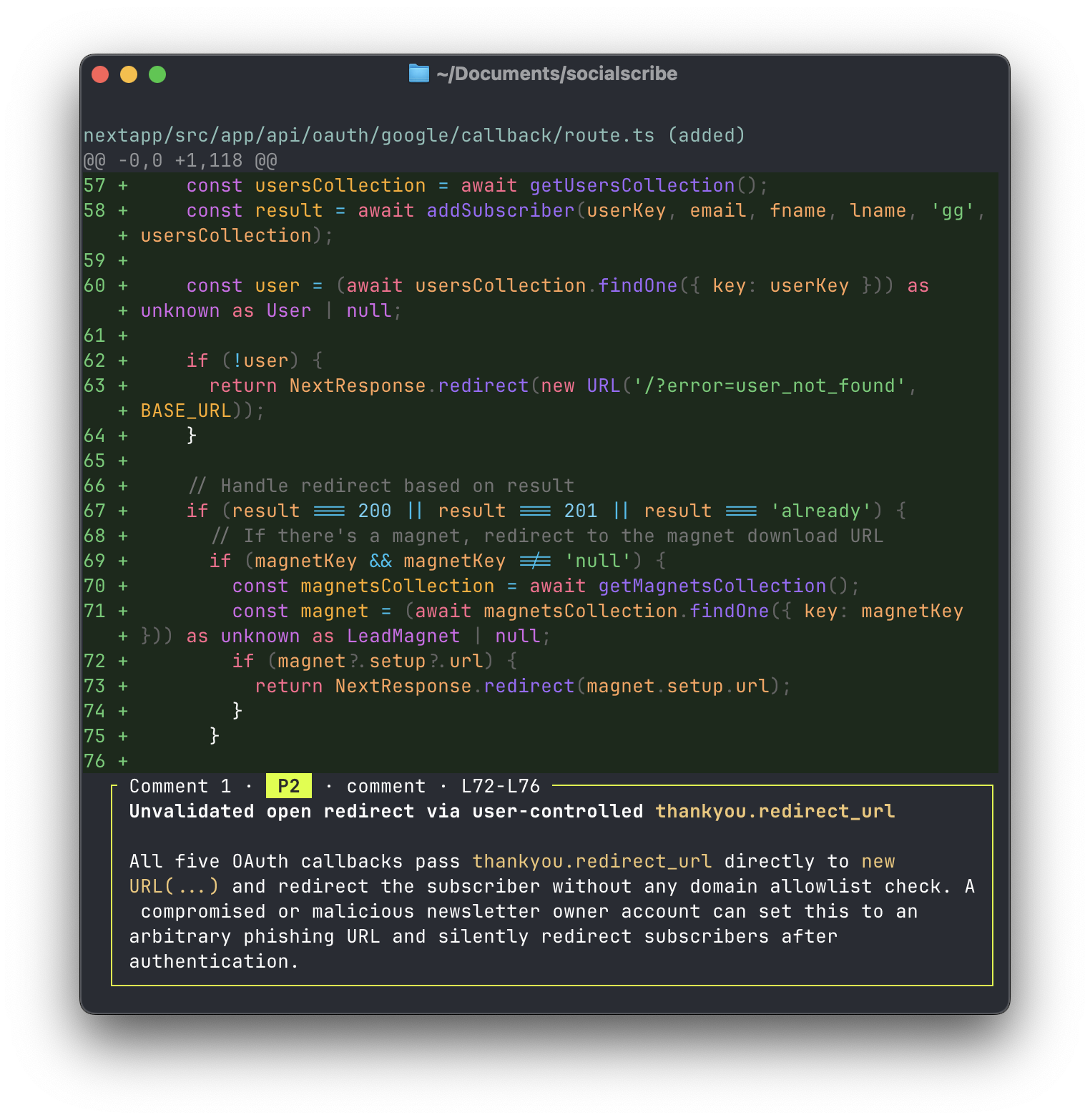 Increase the surrounding code shown with inline findings (default: 15):
```bash theme={}
greptile review --diff --context=25
```
## Output formats
Use JSON when another tool needs to parse the review:
```bash theme={}
greptile review --json
```
Use plain text for agent workflows or scripts:
```bash theme={}
greptile review --agent
```
`--agent` is an alias for `--text`. Plain text is also used automatically when output is piped.
## Reopen a past review
Open a recent review picker:
```bash theme={}
greptile review show
```
Open a review by ID:
```bash theme={}
greptile review show REVIEW_ID
```
## Command reference
| Command | What it does |
| --------------------------- | ------------------------------------------ |
| `greptile login` | Sign in with your Greptile account |
| `greptile logout` | Sign out on this device |
| `greptile whoami` | Show account and org membership |
| `greptile review` | Review the current branch against its base |
| `greptile review show [ID]` | Reopen a past review |
## Review options
| Flag | Purpose |
| ----------------------- | ------------------------------------------------------------------- |
| `-b, --branch=` | Base branch to compare against. Defaults to the repo default branch |
| `--resume` | Continue the latest unfinished review |
| `--diff` | Show findings inline with the relevant code |
| `--context=` | Lines of surrounding code. Default is `15` |
| `--json` | Print machine-readable output |
| `--text, --agent` | Print plain text. `--agent` is an alias for `--text` |
| `--width=` | Set output width |
| `--no-color` | Disable colored output |
## Next
Use Greptile review data from your editor or coding agent.
Increase the surrounding code shown with inline findings (default: 15):
```bash theme={}
greptile review --diff --context=25
```
## Output formats
Use JSON when another tool needs to parse the review:
```bash theme={}
greptile review --json
```
Use plain text for agent workflows or scripts:
```bash theme={}
greptile review --agent
```
`--agent` is an alias for `--text`. Plain text is also used automatically when output is piped.
## Reopen a past review
Open a recent review picker:
```bash theme={}
greptile review show
```
Open a review by ID:
```bash theme={}
greptile review show REVIEW_ID
```
## Command reference
| Command | What it does |
| --------------------------- | ------------------------------------------ |
| `greptile login` | Sign in with your Greptile account |
| `greptile logout` | Sign out on this device |
| `greptile whoami` | Show account and org membership |
| `greptile review` | Review the current branch against its base |
| `greptile review show [ID]` | Reopen a past review |
## Review options
| Flag | Purpose |
| ----------------------- | ------------------------------------------------------------------- |
| `-b, --branch=` | Base branch to compare against. Defaults to the repo default branch |
| `--resume` | Continue the latest unfinished review |
| `--diff` | Show findings inline with the relevant code |
| `--context=` | Lines of surrounding code. Default is `15` |
| `--json` | Print machine-readable output |
| `--text, --agent` | Print plain text. `--agent` is an alias for `--text` |
| `--width=` | Set output width |
| `--no-color` | Disable colored output |
## Next
Use Greptile review data from your editor or coding agent.