> ## Documentation Index
> Fetch the complete documentation index at: https://www.greptile.com/docs/llms.txt
> Use this file to discover all available pages before exploring further.
# Claude Code Plugin
> Install and use the Greptile plugin for Claude Code
The Greptile plugin for Claude Code gives you direct access to your code reviews from the terminal. Fetch PR comments, apply fixes, and search review feedback without leaving your workflow.
**Prerequisite:** Create a Greptile account at [app.greptile.com](https://app.greptile.com/signup) and connect your repositories.
## Installation
Go to [app.greptile.com/settings/organization/api](https://app.greptile.com/settings/organization/api) (Settings > Organization > API Keys) and copy your API key.
Add your API key to your shell configuration:
```bash theme={}
export GREPTILE_API_KEY="your-api-key"
```
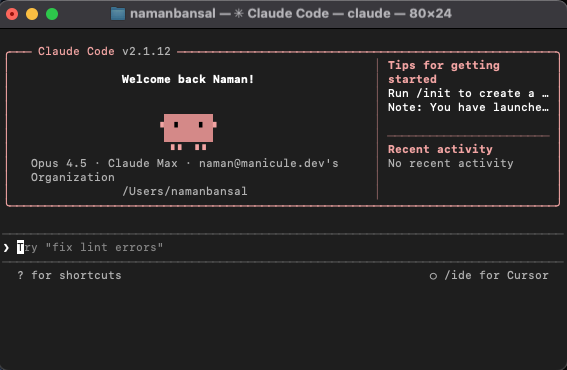
Launch Claude Code in your terminal:
```bash theme={}
claude
```
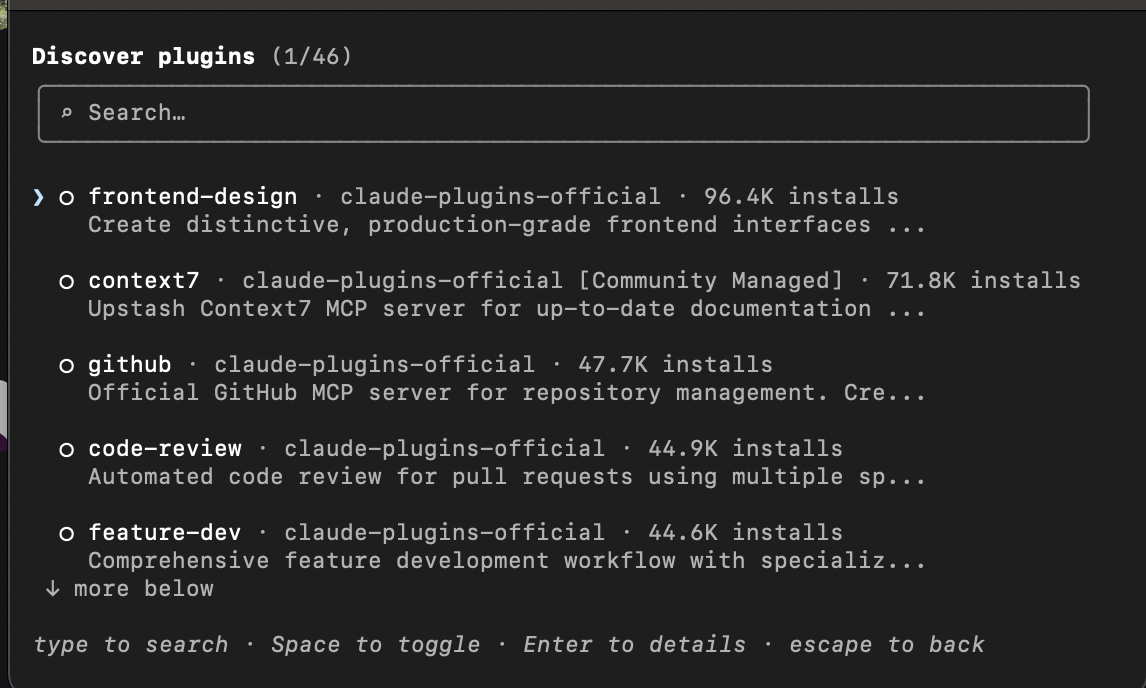
 Type `/plugins` to open the plugin discovery interface.
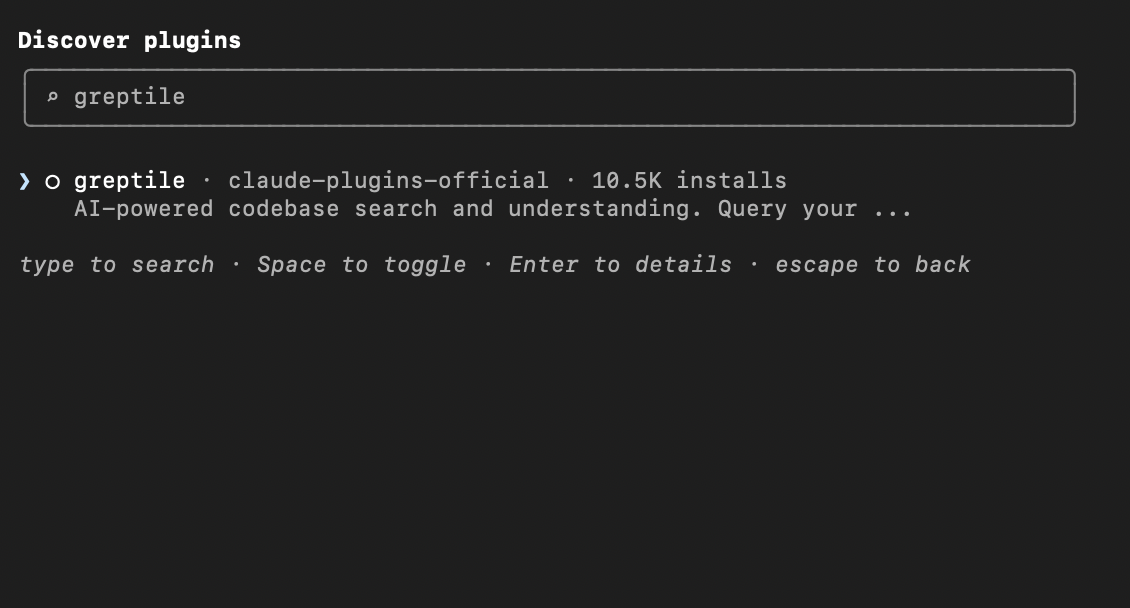
 Type `greptile` to search for the plugin.
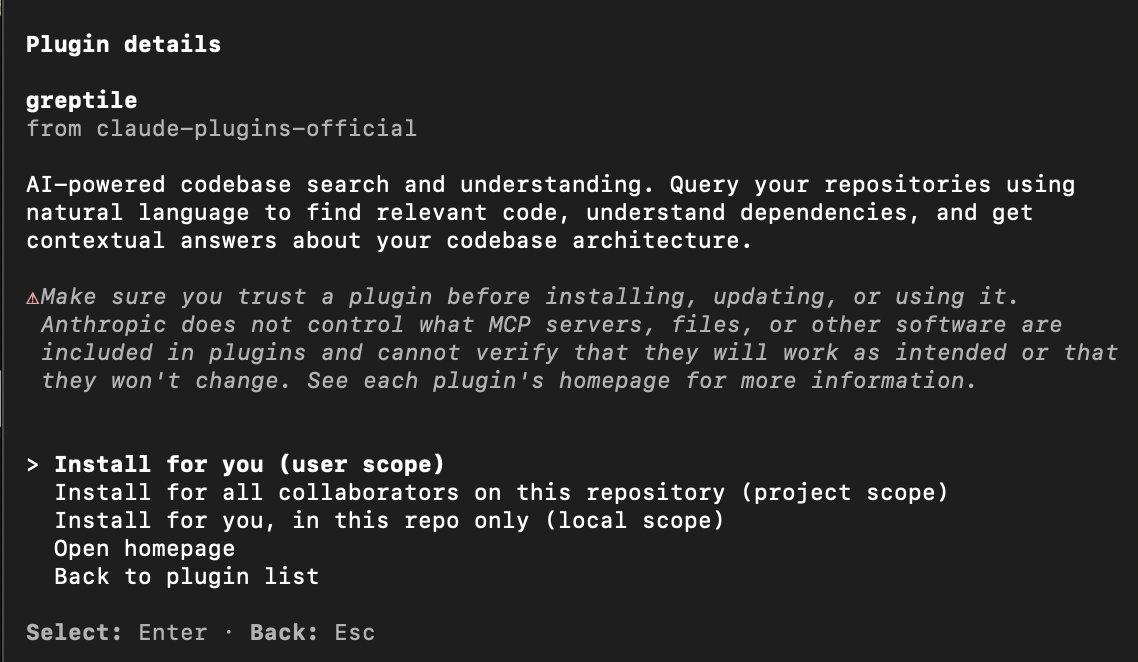
 Select the Greptile plugin and choose your installation scope:
* **User scope** — Available in all your Claude Code sessions
* **Project scope** — Available to all collaborators on this repository
* **Local scope** — Available only in this repository for you
Select the Greptile plugin and choose your installation scope:
* **User scope** — Available in all your Claude Code sessions
* **Project scope** — Available to all collaborators on this repository
* **Local scope** — Available only in this repository for you
 ## What You Can Do
Once installed, ask Claude Code to work with your Greptile reviews using natural language.
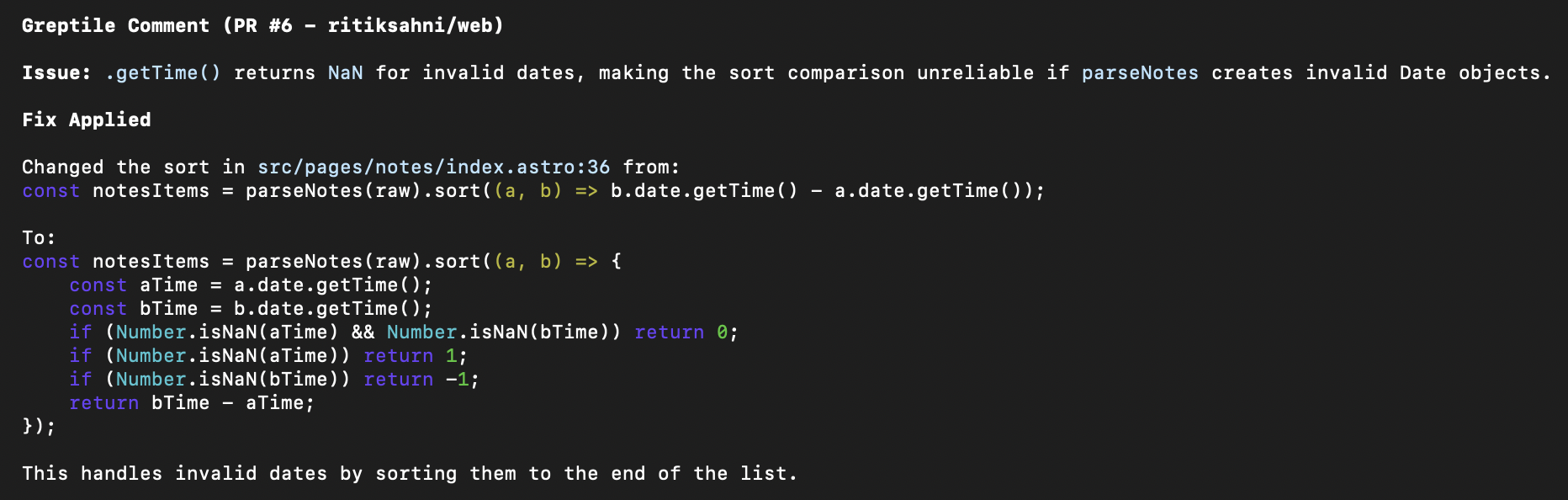
### Fix All Comments on a PR
```
Show me all Greptile comments on my open PR and fix them
```
Claude will fetch unaddressed comments, analyze the suggested fixes, and apply them directly to your code.
## What You Can Do
Once installed, ask Claude Code to work with your Greptile reviews using natural language.
### Fix All Comments on a PR
```
Show me all Greptile comments on my open PR and fix them
```
Claude will fetch unaddressed comments, analyze the suggested fixes, and apply them directly to your code.
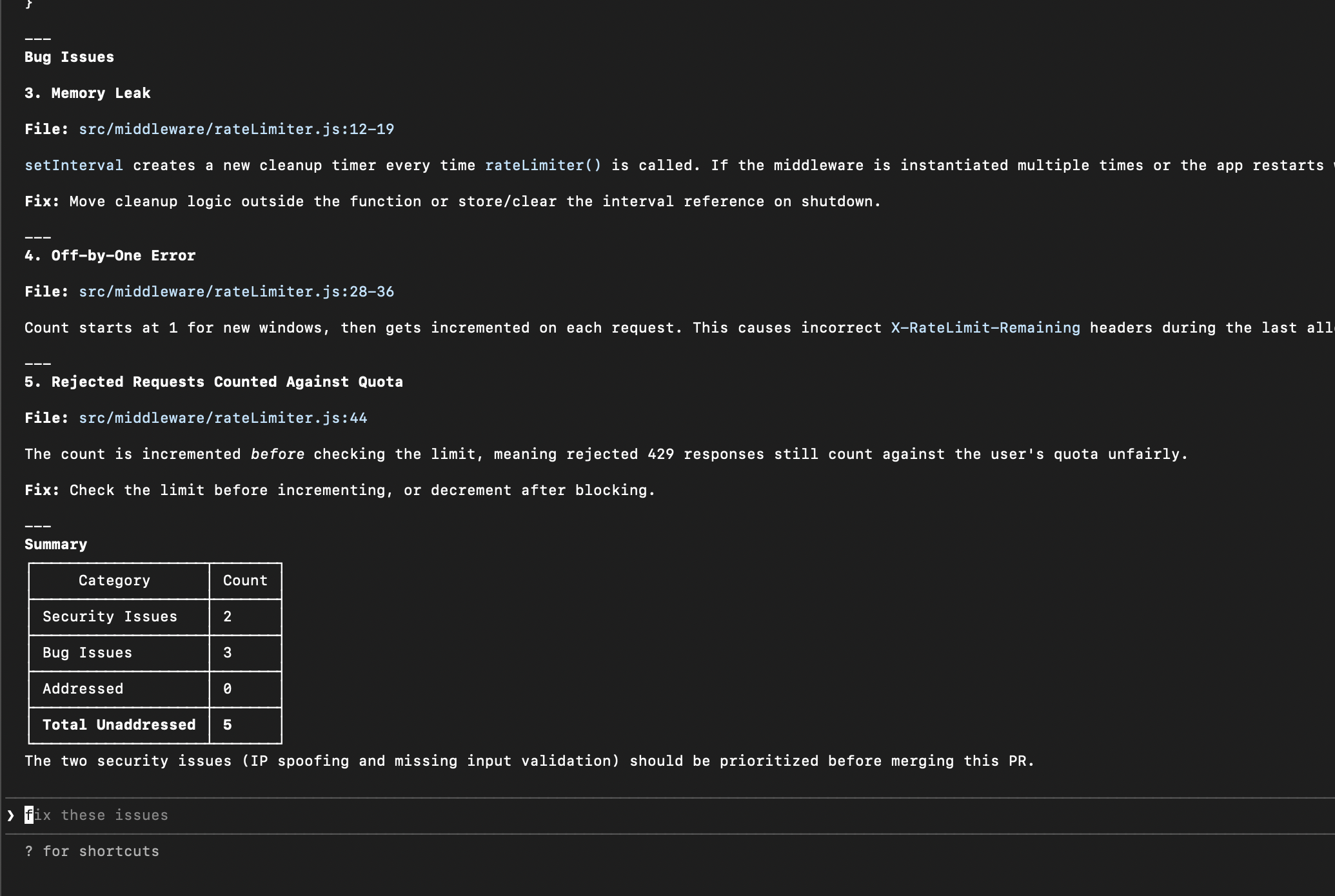
 ### Analyze Security Concerns
```
Get the full review analysis for PR #2 and explain the security concerns
```
Claude fetches the complete review and breaks down any security-related feedback.
### Analyze Security Concerns
```
Get the full review analysis for PR #2 and explain the security concerns
```
Claude fetches the complete review and breaks down any security-related feedback.
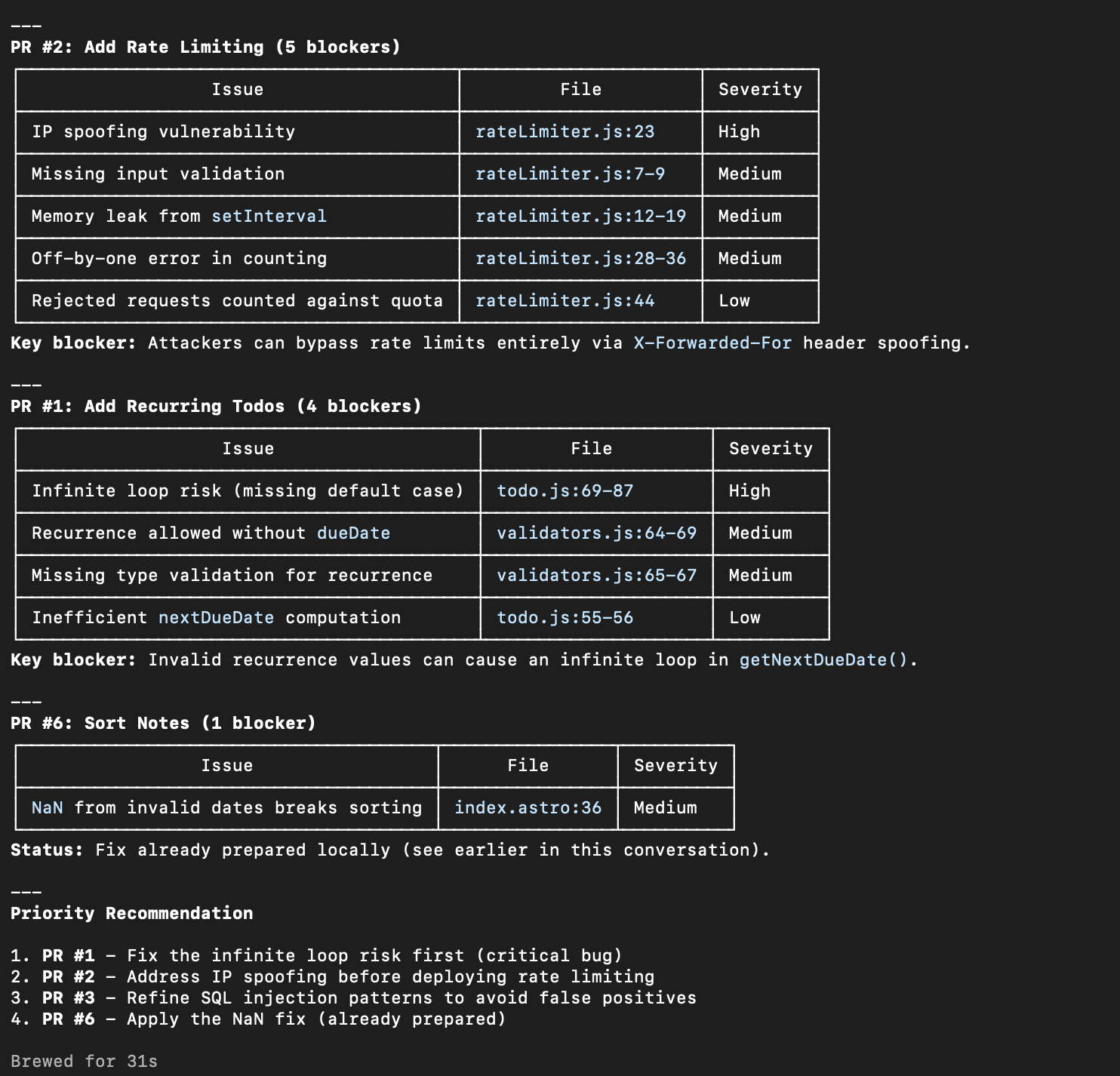
 ### Summarize Blocking Issues
```
Find all my open PRs with unresolved Greptile comments and summarize what's blocking them
```
Get a quick overview of what needs attention across all your open pull requests.
### Summarize Blocking Issues
```
Find all my open PRs with unresolved Greptile comments and summarize what's blocking them
```
Get a quick overview of what needs attention across all your open pull requests.
 ## Example Prompts
### Pull Requests & Reviews
| Task | Prompt |
| ------------------- | --------------------------------------------------------- |
| List your open PRs | "Show me all my open pull requests" |
| Filter by author | "List PRs authored by @johndoe" |
| Get PR details | "Get the full details for PR #42 including review status" |
| Check review status | "Has PR #15 been reviewed? What's still unaddressed?" |
| Trigger a review | "Run a Greptile review on PR #8" |
### Working with Comments
| Task | Prompt |
| ------------------------- | ------------------------------------------------------------------ |
| List unaddressed comments | "What Greptile comments are still unaddressed on PR #5?" |
| Fix a specific comment | "Fix the null check issue Greptile found in auth.ts" |
| Fix all comments | "Show me all unaddressed comments and fix them one by one" |
| Search across repos | "Search for comments mentioning 'SQL injection' across all my PRs" |
| Find patterns | "What are the most common issues Greptile has flagged this month?" |
### Custom Context
| Task | Prompt |
| --------------------- | ------------------------------------------------------------------------------------ |
| List coding standards | "What custom context rules does my org have?" |
| Search for a pattern | "Do we have any rules about error handling?" |
| Create a new rule | "Create a custom context rule: always use parameterized queries for database access" |
## Available Tools
The plugin uses Greptile's [MCP server](/docs/mcp-v2/overview), giving you access to 11 tools:
* **list\_pull\_requests** — List PRs with filters (author, state, branch)
* **get\_merge\_request** — Get full PR details including review analysis
* **list\_merge\_request\_comments** — Get all comments on a PR
[View full parameters →](/docs/mcp-v2/tools#pull-request-tools)
* **list\_code\_reviews** — List reviews with status filters
* **get\_code\_review** — Get detailed review information
* **trigger\_code\_review** — Start a new review on a PR
[View full parameters →](/docs/mcp-v2/tools#code-review-tools)
* **search\_greptile\_comments** — Search all Greptile comments across repos
[View full parameters →](/docs/mcp-v2/tools#comment-search-tool)
* **list\_custom\_context** — List org coding patterns
* **get\_custom\_context** — Get pattern details
* **search\_custom\_context** — Search patterns by content
* **create\_custom\_context** — Create new patterns
[View full parameters →](/docs/mcp-v2/tools#custom-context-tools)
### Learn More
* [Agent Skills](/docs/mcp-v2/skills) — Automate the full auto-fix loop with `/check-pr` and `/greploop`
* [Auto-Fix Workflow](/docs/mcp-v2/auto-fix) — Manual patterns for resolving comments from your IDE
* [Custom Context](/docs/mcp-v2/custom-context) — Managing your team's coding standards
* [Reports & Analytics](/docs/mcp-v2/reports) — Generating review metrics and dashboards
## Troubleshooting
Make sure you're running Claude Code v2.1 or later. Check your version and update:
```bash theme={}
claude --version
claude update
```
Verify your API key is set correctly:
```bash theme={}
echo $GREPTILE_API_KEY
```
If empty, add it to your shell config (`~/.zshrc` or `~/.bashrc`) and restart your terminal.
Check that:
* Your repositories are connected in [app.greptile.com](https://app.greptile.com)
* You have open PRs with Greptile reviews
* Your API key has access to those repositories
## Next Steps
Automate the full auto-fix loop with `/check-pr` and `/greploop`
Manual patterns for resolving review comments
Add your team's coding standards for better reviews
## Example Prompts
### Pull Requests & Reviews
| Task | Prompt |
| ------------------- | --------------------------------------------------------- |
| List your open PRs | "Show me all my open pull requests" |
| Filter by author | "List PRs authored by @johndoe" |
| Get PR details | "Get the full details for PR #42 including review status" |
| Check review status | "Has PR #15 been reviewed? What's still unaddressed?" |
| Trigger a review | "Run a Greptile review on PR #8" |
### Working with Comments
| Task | Prompt |
| ------------------------- | ------------------------------------------------------------------ |
| List unaddressed comments | "What Greptile comments are still unaddressed on PR #5?" |
| Fix a specific comment | "Fix the null check issue Greptile found in auth.ts" |
| Fix all comments | "Show me all unaddressed comments and fix them one by one" |
| Search across repos | "Search for comments mentioning 'SQL injection' across all my PRs" |
| Find patterns | "What are the most common issues Greptile has flagged this month?" |
### Custom Context
| Task | Prompt |
| --------------------- | ------------------------------------------------------------------------------------ |
| List coding standards | "What custom context rules does my org have?" |
| Search for a pattern | "Do we have any rules about error handling?" |
| Create a new rule | "Create a custom context rule: always use parameterized queries for database access" |
## Available Tools
The plugin uses Greptile's [MCP server](/docs/mcp-v2/overview), giving you access to 11 tools:
* **list\_pull\_requests** — List PRs with filters (author, state, branch)
* **get\_merge\_request** — Get full PR details including review analysis
* **list\_merge\_request\_comments** — Get all comments on a PR
[View full parameters →](/docs/mcp-v2/tools#pull-request-tools)
* **list\_code\_reviews** — List reviews with status filters
* **get\_code\_review** — Get detailed review information
* **trigger\_code\_review** — Start a new review on a PR
[View full parameters →](/docs/mcp-v2/tools#code-review-tools)
* **search\_greptile\_comments** — Search all Greptile comments across repos
[View full parameters →](/docs/mcp-v2/tools#comment-search-tool)
* **list\_custom\_context** — List org coding patterns
* **get\_custom\_context** — Get pattern details
* **search\_custom\_context** — Search patterns by content
* **create\_custom\_context** — Create new patterns
[View full parameters →](/docs/mcp-v2/tools#custom-context-tools)
### Learn More
* [Agent Skills](/docs/mcp-v2/skills) — Automate the full auto-fix loop with `/check-pr` and `/greploop`
* [Auto-Fix Workflow](/docs/mcp-v2/auto-fix) — Manual patterns for resolving comments from your IDE
* [Custom Context](/docs/mcp-v2/custom-context) — Managing your team's coding standards
* [Reports & Analytics](/docs/mcp-v2/reports) — Generating review metrics and dashboards
## Troubleshooting
Make sure you're running Claude Code v2.1 or later. Check your version and update:
```bash theme={}
claude --version
claude update
```
Verify your API key is set correctly:
```bash theme={}
echo $GREPTILE_API_KEY
```
If empty, add it to your shell config (`~/.zshrc` or `~/.bashrc`) and restart your terminal.
Check that:
* Your repositories are connected in [app.greptile.com](https://app.greptile.com)
* You have open PRs with Greptile reviews
* Your API key has access to those repositories
## Next Steps
Automate the full auto-fix loop with `/check-pr` and `/greploop`
Manual patterns for resolving review comments
Add your team's coding standards for better reviews