Use Greptile MCP tools to fetch unaddressed comments and apply fixes directly from your IDE.
Your First Auto-Fix
Fetch unaddressed comments
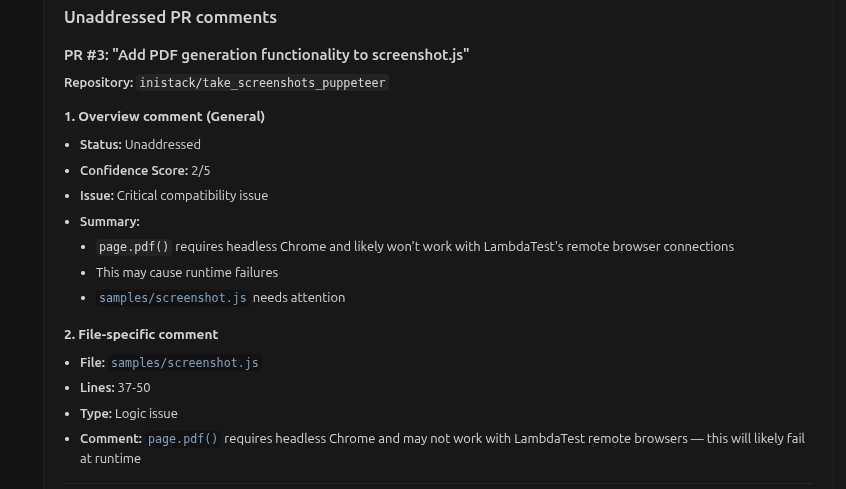
Ask your AI assistant: List unaddressed PR comments
Review the response
The assistant returns comments with file paths, line numbers, and severity.
Apply fixes
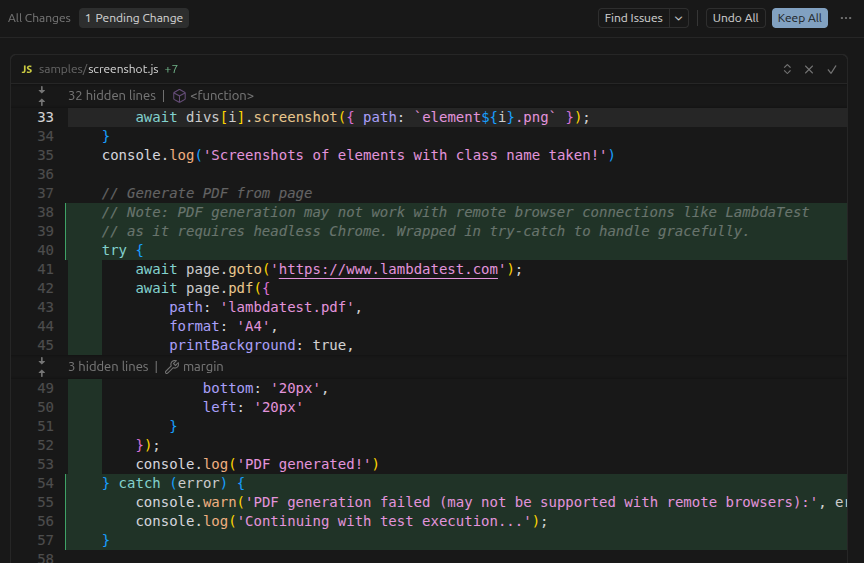
Ask the assistant to fix specific issues: Wrap the PDF generation in a try-catch block
Review and accept
Review the changes, then click Keep All to apply.
Use Cases Fix by Category
Fix by File
Fix by Severity
Batch Operations
Fix All Style Issues Show me all style-related Greptile comments and fix them automatically
Style fixes are safe to auto-apply since they don’t change logic. Fix All Naming Issues Find all naming convention issues in Greptile comments and fix them
Fix Import/Export Issues Fix all import ordering and unused import issues flagged by Greptile
Fix Current File What Greptile comments apply to this file? Fix the safe ones.
Fix Staged Files Check my staged files for unaddressed Greptile comments and fix them before I commit
Fix Specific Directory Fix all Greptile issues in the src/utils/ directory
High Confidence Only Fix all Greptile comments with confidence 4 or higher
Critical Issues First List critical and security issues from Greptile, then help me fix them one by one
Quick Wins What are the easiest Greptile comments to fix? Do them automatically.
Fix Multiple PRs Show unaddressed comments across all my open PRs and fix the style issues
Fix by Number Fix comments 1, 3, and 5 from the list above
Fix All Safe Issues Fix all Greptile comments that are safe to auto-fix (style, naming, formatting)
Each Greptile comment includes:
Field Description addressedWhether the comment has been fixed confidenceScoreGreptile’s confidence (1-5) typelogic, security, performance, style, best-practicefilePathFile where issue occurs lineStart, lineEndLine range linkedMemoryRelated custom context pattern
Confidence Score Guide Score Meaning Recommended Action 5/5 Clear issue, high confidence Safe to auto-fix 4/5 High confidence, minor uncertainty Safe to auto-fix 3/5 Moderate confidence Review before fixing 2/5 Lower confidence Manual verification needed 1/5 Low confidence, uncertain Manual review required
What to Auto-Fix vs Manual Review Safe for Auto-Fix
Review First
Manual Only
Code style and formatting
Simple typo corrections
Naming convention fixes
Basic null checks
Import ordering
Missing semicolons/brackets
Whitespace issues
Comments with confidence 4-5
Error handling additions
Type annotations
Default value changes
Comments with confidence 3
Architecture changes
Complex logic modifications
Security fixes affecting business logic
Performance optimizations with tradeoffs
Authentication/authorization changes
Database query modifications
Comments with confidence 1-2
Always review AI-generated fixes before applying, especially for security and logic issues.
Advanced Workflows
Before committing, ensure no issues remain: Are there any unaddressed Greptile comments in my staged files? If so, which ones are safe to fix automatically?
Understand why before changing: Explain why Greptile flagged this issue. Show the linked coding pattern and decide if the fix is appropriate.
Ensure fixes don’t break anything: Fix this Greptile comment and show me what tests I should run to verify the change.
Turn recurring fixes into patterns: I've fixed this type of issue multiple times. Create a custom context rule to catch it in future reviews.
When you have many comments: Categorize all unaddressed comments into: 1. Auto-fixable (do these now) 2. Need review (show me these) 3. Won't fix (explain why these might be false positives)
Next Steps