Static Application Security Testing (SAST) tools are a fundamental part of code quality control, but they're not the only security layer you need if you're shipping complex code at scale. The oldest SAST tools predate today's AI coding tools by decades. AI is now part of every stage of development, and static analysis alone can't keep up with the volume of AI-generated code or the risks that only show up when that code runs.
This guide compares five of the best SAST tools on core functionality, languages, pricing, and ideal use cases. For each one, we'll cover where it's strong, where it falls short, and which teams it fits best.
What is a SAST tool?
SAST (Static Application Security Testing) tools analyze your application's source code, bytecode, or binaries for security vulnerabilities like SQL injection, cross-site scripting, authentication bypasses, and other common exploit patterns, without running the application.
Engineering and DevSecOps teams typically use SAST tools early in the software development lifecycle to "shift security left," catching critical bugs and compliance violations long before code reaches production.
Quick overview: The top 5 best SAST tools in 2026
We looked at the best SAST scanning tools available for engineering teams today and narrowed the list down to the top five:
- Semgrep: Best for lightweight CI/CD speed with custom rules
- Checkmarx One: Best for enterprise governance across complex architectures
- Snyk: Best for fast, developer-first IDE scanning
- Aikido: Best for small and mid-market teams wanting low-noise triage
- GitHub CodeQL: Best for deep semantic queries in GitHub workflows
Greptile isn't a SAST tool, but we'll also look at Greptile, an AI code reviewer with a built-in security check, as the best option for full-context, security-focused AI code review to run alongside your SAST scanner.
Here's a quick look at how they stack up:
| Tool | Best for | Core features | Pricing |
|---|---|---|---|
| Semgrep | Lightweight CI/CD speed with custom rules | Pattern-matching static analysis with cross-file taint analysis | Free for up to 10 contributors; from $30 / contributor / month for Code (SAST) |
| Checkmarx One | Enterprise governance across complex architectures | Deep data flow and control flow taint analysis across large, multi-language codebases | Custom pricing only |
| Snyk | Fast, developer-first IDE scanning | AI-assisted static analysis with data flow tracking and suggested fixes | Free tier; Team plan from $25 / developer / month |
| Aikido | Small and mid-market teams wanting low-noise triage | Multiple scanners in one feed, reachability analysis, and AI noise filtering | Free for 2 users; paid plans from $300 / month (as of October 2026) |
| GitHub CodeQL | Deep semantic queries in GitHub workflows | Code-as-a-database semantic analysis with deep data flow and taint tracking | Free for public repositories; $30 / active committer / month with GitHub Code Security |
| Greptile (not SAST) | Full-context, security-focused AI code review alongside your SAST tool | Full-codebase graph and AI review, plus a security check with Opengrep rules, SCA, and an AI security agent | Free Starter plan for 1 active developer; Pro from $30 / seat / month |
1. Semgrep: Best for lightweight CI/CD speed with custom rules
Semgrep is a fast static analysis tool with an open-source core, designed for modern developer workflows. Its rules look like the code they match, so you don't need to learn a separate query language to write them. It runs inside CI/CD pipelines and comments on pull requests, so developers get feedback where they already review code. Security and engineering teams can also write custom rules to enforce internal coding guidelines and tune the tool to flag only what matters to them.
Core functionality: Pattern-matching static analysis with cross-file taint analysis.
Languages: Python, JavaScript/TypeScript, Java, Go, C/C++, C#, Rust, Ruby, Kotlin, Terraform, and many more.
Ideal for: Engineering and DevSecOps teams that value pipeline speed, want inline pull request checks, and need the flexibility to write custom security rules for their own codebase conventions.
Pricing:
- Free for up to 10 contributors (and up to 10 private repositories)
- From $30 / contributor / month for Code (SAST) or Supply Chain (SCA)
- Custom Enterprise pricing
| Pros | Cons |
|---|---|
|
|
Key comparisons
- Semgrep vs. Checkmarx One: Semgrep focuses on speed, developer experience, and simple custom rules. Checkmarx One offers deeper compliance reporting and multi-tier analysis, with longer scans and more setup. Checkmarx One fits large, compliance-heavy enterprises, while Semgrep shines with fast-moving engineering orgs and smaller product teams.
- Semgrep vs. Snyk: Snyk leans on AI for developer-friendly fixes and strong IDE integration. Semgrep gives teams full control to write and customize security rules for their own codebase.
2. Checkmarx One: Best for enterprise governance across complex architectures
Checkmarx One is an enterprise application security platform built for centralized AppSec teams. This industry mainstay focuses on deep taint tracking across complex multi-repo architectures and legacy codebases. It's known for centralized governance, extensive rule tuning, and compliance reporting for large engineering organizations.
Core functionality: Deep data flow and control flow taint analysis across large, multi-language codebases.
Languages: Modern stacks (Java, C#, Go, TypeScript, and more) plus legacy languages like COBOL, Apex, and VB6.
Ideal for: Large enterprises with strict compliance needs across complex, multi-language architectures.
Pricing: Custom, quote-based pricing only. Checkmarx doesn't publish list prices; quotes depend on the modules you need (SAST, SCA, DAST, and so on), your deployment model, and the number of developers in scope.
| Pros | Cons |
|---|---|
|
|
Key comparisons
- Checkmarx One vs. Snyk: Snyk is built for fast developer adoption and immediate fixes in the IDE, while Checkmarx One is built for centralized AppSec teams that need compliance enforcement, deep auditability, and support for legacy languages.
- Checkmarx One vs. Aikido: Like Snyk, Aikido is a developer-centric platform with lightweight scanning. Checkmarx One is an established enterprise platform built for compliance-heavy static analysis across massive codebases.
3. Snyk: Best for fast, developer-first IDE scanning
Snyk Code is Snyk's SAST product: it scans your proprietary source code for security vulnerabilities and flaws. Unlike heavyweight governance tools built for separate security teams (like Checkmarx One), Snyk plugs directly into developer IDEs and PR workflows to give real-time, actionable feedback.
Core functionality: AI-assisted static analysis with data flow tracking and suggested fixes.
Languages: JavaScript/TypeScript, Python, Java, Go, C#, C/C++, PHP, Ruby, Swift, and more.
Ideal for: Product-led engineering teams that want instant IDE feedback and automated fix suggestions inside their everyday tools.
Pricing:
- Free tier with 100 Snyk Code tests / month
- Team plan from $25 / developer / month for up to 10 developers, with 1,000 Snyk Code tests / month and Jira integration
- Custom Enterprise pricing
| Pros | Cons |
|---|---|
|
|
Key comparisons
- Snyk vs. Aikido: Snyk offers a deeper, more polished IDE experience with AI-generated fixes. Aikido focuses on consolidating your security stack (SAST, SCA, IaC, secrets) with strong false-positive reduction. Aikido suits small teams that want a low-noise security hub, and Snyk suits teams that want developers fixing issues directly in the IDE.
- Snyk vs. GitHub CodeQL: Snyk prioritizes usability, developer speed, and instant IDE feedback. CodeQL offers far deeper semantic queries for security researchers, but it comes with longer build-and-scan times and its own query language (QL).
4. Aikido: Best for small and mid-market teams wanting low-noise triage
Aikido is a developer-first security platform that combines multiple AppSec scanners, including SAST, SCA, IaC scanning, and secrets detection. By putting code and cloud security in one feed, Aikido gives engineering teams risk-based prioritization without tool sprawl.
Core functionality: Multiple scanners in one feed, reachability analysis, and AI noise filtering.
Languages: JavaScript/TypeScript, Python, Go, Java, C#, PHP, Ruby, Rust, Elixir, and more.
Ideal for: Startups and SMBs looking for a low-maintenance, all-in-one security hub with fast setup and PR visibility.
Pricing (as of October 2026):
- Free for up to 2 users and 10 repositories
- Basic from $300 / month and Pro from $600 / month, each including 10 users
- Custom Enterprise pricing
| Pros | Cons |
|---|---|
|
|
Key comparisons
- Aikido vs. Semgrep: Semgrep focuses on fast SAST pipeline scanning and custom rules. Aikido bundles more scanners into one platform with minimal alert noise.
- Aikido vs. GitHub CodeQL: CodeQL is an advanced semantic query tool built for security researchers, while Aikido is an out-of-the-box security hub for small, fast-moving dev teams.
5. GitHub CodeQL: Best for deep semantic queries in GitHub workflows
GitHub CodeQL is a semantic code analysis engine that treats source code as data, so security researchers can query a codebase like a database. Because it evaluates semantic context and data flow paths, not just surface-level patterns, it can uncover issues that pattern matching misses.
Core functionality: Code-as-a-database semantic analysis with deep data flow and taint tracking.
Languages: C/C++, C#, Go, Java/Kotlin, JavaScript/TypeScript, Python, Ruby, Swift, and Rust.
Ideal for: AppSec researchers, open-source maintainers, and GitHub Team or Enterprise customers that need deep semantic analysis.
Pricing:
- Free for public repositories
- $30 / active committer / month for private repositories through GitHub Code Security, available on GitHub Team and Enterprise plans
| Pros | Cons |
|---|---|
|
|
Key comparisons
- GitHub CodeQL vs. Semgrep: Semgrep is best for fast pipeline scans using simple, lightweight rules. CodeQL builds a database of your code for much deeper taint tracking, but it runs slower. When you're choosing a SAST tool, decide whether speed or depth matters most to your team. (Most tools won't give you both.)
- GitHub CodeQL vs. Checkmarx One: Checkmarx One is a standalone platform built for broad compliance and legacy languages, while CodeQL offers deeper custom querying and tighter native integration for GitHub-hosted codebases.
6. Greptile: Best for full-context, security-focused AI code review
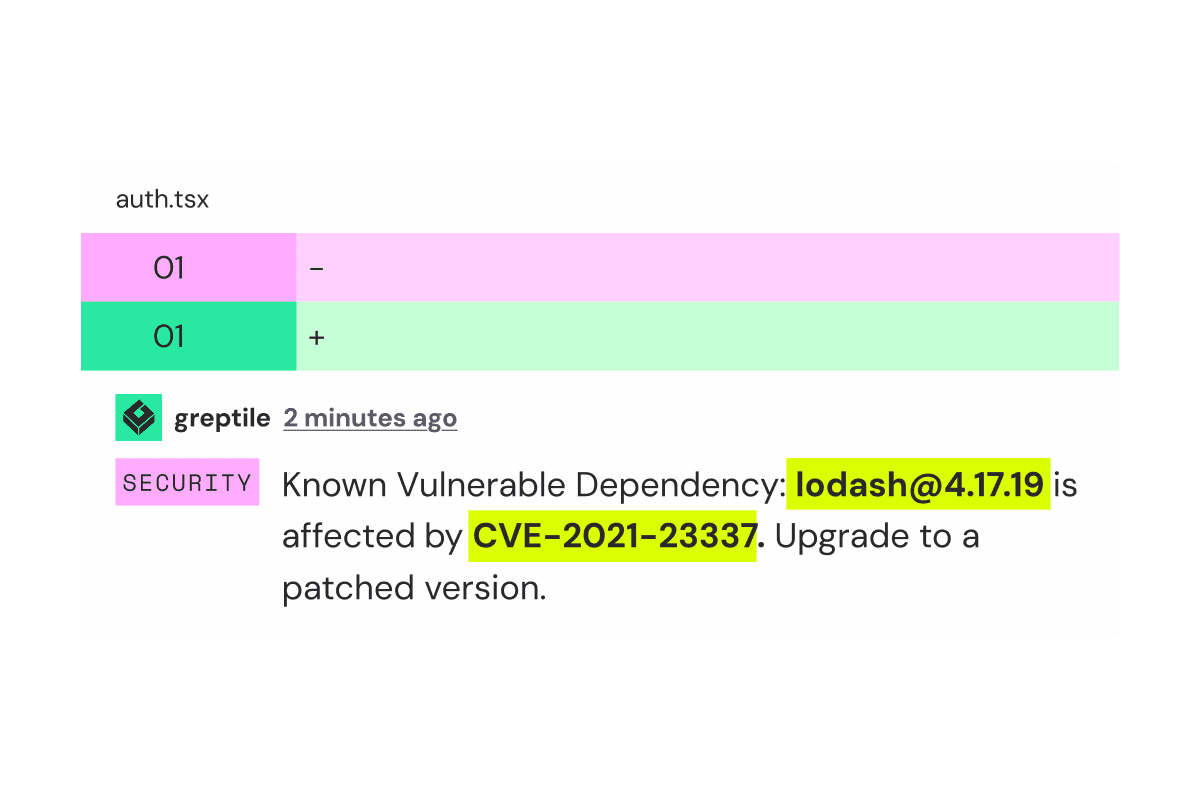
Greptile isn't a SAST tool. It's an AI code review agent that reviews pull requests with your entire codebase in mind, with a security check built in. Instead of replacing your SAST scanner, Greptile adds layers that static scanning doesn't cover:
- Full-context AI code review that indexes your whole codebase and reviews each PR the way a senior engineer would: looking at context, intent, and architecture, not just rules.
- A built-in security check that pairs Opengrep rule-based scanning for dangerous code patterns, SCA to catch known CVEs in your dependencies, and an AI security agent that understands context and catches issues static tools can't.
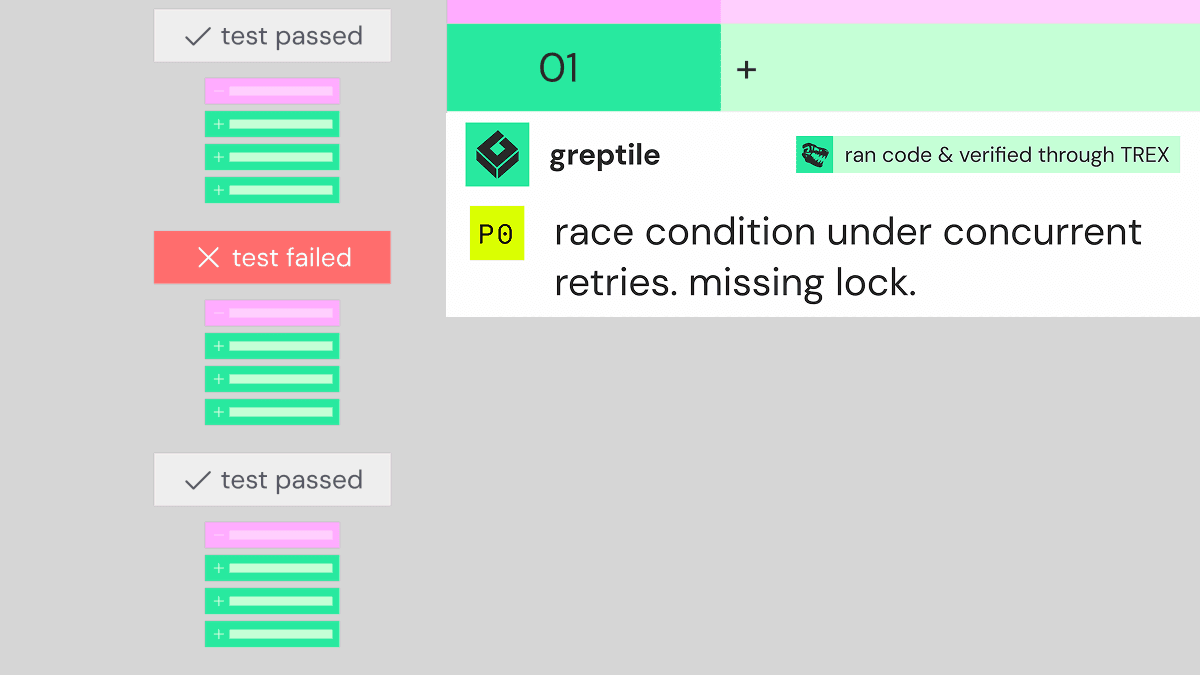
- Runtime testing with TREX, now in private beta. Once enabled, TREX builds your repo in an isolated sandbox and runs the change on pull requests that match your filters, catching bugs that only show up when code actually runs.
Core functionality: Full-codebase graph indexing paired with AI reasoning for code review, plus a built-in security check.
Languages: Language-agnostic; Greptile works with any programming language in your codebase.
Ideal for: Engineering teams that want an automated PR reviewer to catch complex logic bugs and cross-file security vulnerabilities that traditional SAST tools miss.
Pricing:
- Free Starter plan for 1 active developer, with 50 credits / month and unlimited repositories
- Free for qualified open-source projects
- Pro at $30 / seat / month with 50 credits per seat per month and a 14-day free trial
- Custom Enterprise pricing
| Pros | Cons |
|---|---|
|
|
Key comparisons
- Greptile vs. traditional SAST: Traditional SAST checks code against predefined rules and static patterns. Greptile reviews pull requests using rule-based scanning and full-codebase context. Running both gives you deterministic security checks for compliance plus review that understands how your codebase fits together.
Best SAST tools by language
Many SAST and AI code review tools offer broad language coverage (or language-agnostic reasoning), but some tools stand out for specific languages. Here's how our top choices stack up:
| Language | Best tool(s) | Why |
|---|---|---|
| Language-agnostic | Greptile (alongside a SAST tool) | Greptile provides context-aware AI code review for any language in your codebase. |
| Ruby | Semgrep | Semgrep makes it easy to write lightweight custom rules for Rails best practices and run them as inline PR checks. |
| Java | Checkmarx One | Checkmarx One is built for large, complex enterprise Java architectures that need deep data flow taint analysis across services. |
| Rust | CodeQL | CodeQL builds a full semantic database for Rust code, which makes it a strong fit for tracking complex logic flaws. |
| C# | Snyk, Checkmarx One | Snyk gives .NET developers fast IDE feedback, while Checkmarx One covers legacy and enterprise .NET frameworks. |
| Kotlin | Semgrep, CodeQL | Semgrep offers fast, lightweight CI checks for Kotlin and Android, and CodeQL traces security risks across complex app architectures. |
| TypeScript | Aikido | Aikido pairs TypeScript SAST with npm dependency scanning (SCA) and secrets detection in a low-noise dashboard. |
| Python | Snyk | Snyk is strong for real-time IDE feedback and AI-suggested fixes in Python web frameworks like Django, FastAPI, and Flask. |
| Swift | CodeQL, Snyk | CodeQL offers strong semantic analysis for iOS and macOS codebases, and Snyk's IDE integration gives mobile engineers fast feedback on Swift changes. |
| Legacy languages (e.g., COBOL, VB6) | Checkmarx One | Checkmarx One is the usual choice for older enterprise languages that developer-first scanners don't cover. |
How to evaluate a SAST tool: What to look for and which is right for your team
Choosing the best SAST tool comes down to how your team actually builds software, and which tools will fit into that workflow without adding extra work and noisy, irrelevant feedback. Here's what to think about as you evaluate your options:
- Language and stack support: You need a tool that natively supports your core languages and works with the rest of your stack. This matters most if you rely on niche or legacy tech.
- Speed vs. depth: This is one of the core tradeoffs in SAST. Do you need lightweight pull request feedback in seconds, or deep analysis that takes longer to run but is thorough enough for strict compliance and audit standards?
- Low false positives: If a tool constantly raises false alarms, your team will start ignoring it, and your code gets less secure over time. Like speed vs. depth, you also need to balance precision vs. recall. Ideally, a tool is precise without missing anything critical.
- AI analysis: Traditional SAST tools rely on rule matching. Tools with stronger AI capabilities, like Greptile, can understand whole-repository context and suggest fixes you can act on.
- Codebase context: The best tools build an index of your whole codebase to understand cross-file dependencies. Strong indexing also cuts noise, because it helps filter out flaws in unreachable code and focus attention on vulnerabilities that can actually be exploited.
The future of SAST requires context
Static security testing is essential for catching known vulnerability patterns and baseline rule violations early in development. But traditional SAST tools have major blind spots, and AI-generated code is making them bigger.
First, there's more code to scan, and more of it sticks around. In a study of AI-generated code in GitHub repositories, Liu et al. tracked 464,900 issues introduced by AI coding tools, including code smells, correctness bugs, and security issues. 105,364 of them still survived in the latest version of the code: a survival rate of 22.7% [1]. And He et al.'s study of Cursor adoption across 806 open-source repos found that static analysis warnings rose 30% and code complexity rose 41% after adoption, while the velocity gains faded within two months [2].
Second, agents fail in different ways than humans do. When Greptile analyzed review comments on PRs written end to end by coding agents, agent PRs weren't worse than human PRs overall, but each agent's mistakes clustered in different places. Compared with human-written code, per line of code:
- Cursor's background agents were flagged most often for N+1 queries (3.45x the human rate), breaking existing behavior (2.37x), and missing tests (2.37x).
- Codex's above-human categories clustered around configuration and breakage, like env var and config bugs (1.35x).
- Claude's highest categories included IDOR and missing tenant checks (1.75x), and auth bypasses came in at 1.50x.
The bugs don't disappear: they just move. Whatever security process you built for human-written code probably wasn't built for those patterns.
As teams write more code, faster, with AI, the security review load keeps growing. That calls for security tools that evaluate your code based on the logic, architecture, and context of your whole repository.
But most security testing is either too noisy or too shallow. Tools get noisy because there are usually lots of potential issues, and only some of them are real issues needing attention. Noisy tools flag too many possible vulnerabilities, and developers learn to ignore them.
Other tools aim for less noise, but then miss things: either because the analysis isn't deep enough, or because they don't have the context to judge which threats are real in your codebase.
And static tools share one limit no matter how good their rules are: they can't see what happens when the code actually runs. Race conditions, broken user flows, misconfigured services, and auth checks that only fail against a live database don't show up in a static scan.
Modern security testing needs deeper analysis, context-rich review, and runtime testing to catch errors before code hits production.
To get more coverage, pair your SAST tool(s) with an AI code review tool like Greptile. We're building Greptile with a strong focus on security for agentic development, with features like:
- Built-in security scanning that flags security risks and known CVEs in pull requests, alongside your traditional SAST tooling.
- Full codebase mapping, so Greptile evaluates changes in the context of your broader application architecture. That lets it catch cross-file bugs that static scanners miss, while skipping "potential" issues that aren't relevant to your codebase.
- Runtime testing with TREX, because static scanners can't see what happens when your code runs. TREX is in private beta and needs to be enabled for your repos. It runs on pull requests that match the filters you set, in an isolated sandbox built from your repo's environment, and catches runtime bugs and potential security vulnerabilities before deployment. Its PR comment links to the evidence from each run: logs, screenshots, scripts, recordings, or API output.
- Learning and noise reduction that prevents alert fatigue. Greptile learns from your team's reactions and replies, so its PR comments get more accurate and relevant over time.
Together, traditional SAST and AI-powered code review give you the speed, depth, and context to protect complex applications and agentic development workflows from vulnerabilities. Want to see what Greptile catches on your codebase? Try Greptile for security-focused code review, free for 14 days →
FAQs about the best SAST tools in 2026
What are the main types of security testing for software?
The main types of security testing for software are Static Application Security Testing (SAST), Dynamic Application Security Testing (DAST), Interactive Application Security Testing (IAST), Software Composition Analysis (SCA), penetration testing, and secret detection and scanning.
Do we actually need a SAST tool?
For most teams, yes. SAST tools catch known vulnerability patterns in your code before it goes live, and they're the most common way teams show auditors that code is scanned for vulnerabilities before release. Compliance frameworks like PCI DSS require you to identify vulnerabilities in custom code before it ships, and many security and audit teams expect a SAST tool as part of that evidence. SAST alone isn't enough, though: pair it with tools that understand your codebase's context and test how code behaves at runtime.
What's the difference between SAST and DAST tools?
SAST (Static Application Security Testing) tools analyze source code before the application runs, while DAST (Dynamic Application Security Testing) tools test a running application for vulnerabilities that only show up when the system is actively executing.
What are examples of SAST tools?
SAST tools approach security scanning with different priorities and methods. Some are designed for fast, lightweight, developer-friendly inline feedback, while others are built for deep, complex enterprise security governance. Popular SAST tools include Semgrep, Checkmarx One, Snyk, Aikido, and GitHub CodeQL.
What is the difference between a SAST scan and an SCA scan?
SAST scans the code your developers write, while SCA inspects the open-source and third-party components your team imports. Some developer-first tools (like Aikido and Snyk) run multiple types of scans to give you a fuller risk profile across your code, dependencies, and infrastructure.
Which SAST tool is best for enterprise codebases?
Checkmarx One is widely known for thorough enterprise governance, especially for organizations with large, complex codebases and legacy languages. Many enterprises also pair their SAST tool with a security-focused AI code reviewer like Greptile, which indexes the full repository and reviews each pull request in context. For more options, see our guide to the best security-focused AI code review tools.
What are the best AI SAST tools?
The best AI SAST tools prioritize low false-positive rates, PR-native reviews, and reachability analysis. Aikido uses AI to filter out noise, Checkmarx combines rule-based and AI scanning, and Snyk uses AI to suggest fixes. Many teams also add a security-focused, context-rich AI code reviewer like Greptile alongside their SAST tool.
Sources
[1] Liu, Y., Widyasari, R., Zhao, Y., Irsan, I.C., Chen, J., and Lo, D. "Debt Behind the AI Boom: A Large-Scale Empirical Study of AI-Generated Code in the Wild." arXiv:2603.28592, March 2026. arxiv.org/abs/2603.28592
[2] He, H., Miller, C., Agarwal, S., Kästner, C., and Vasilescu, B. "Speed at the Cost of Quality: How Cursor AI Increases Short-Term Velocity and Long-Term Complexity in Open-Source Projects." Mining Software Repositories (MSR '26), April 2026. cmustrudel.github.io/papers/msr2026he.pdf