Sandbox environments have a lot of uses in software development, but many teams still keep them in a narrow box: developer testing, experimentation, and reducing risk.
Those are all good uses. In an agentic coding workflow, though, sandboxes can do much more. Many growing engineering teams are running into problems like these right now:
- They're using multiple coding agents, PR volume has jumped, and code review has become a bottleneck. Bugs are slipping through to prod that their review process isn't catching.
- They've adopted AI code review tools, but the reviews are noisy and imprecise. They miss bugs in AI-generated code that only show up at runtime, when they're messy and costly to fix.
- AI agents are increasing velocity, but trust and validation aren't keeping pace. Either the agents don't have the context they need to avoid breaking something elsewhere in the codebase, or they have too much freedom and need constant supervision.
Sandboxing can help with all of these, and in this article we'll show you how.
What is a sandbox environment?
A sandbox environment is a controlled, isolated computing environment, often used for testing. In a sandbox, you can run, experiment with, test, and analyze code without affecting other systems on your machine or your production environment.
Think of it like a literal sandbox for children: it gives them space to play, explore, build things, and make a mess, but the mess stays in the sandbox.
Key features of a sandbox environment
Most sandbox environments share a few key features in how they work:
- An isolated environment. This is the core of any sandbox. A sandbox uses a virtual machine or containers to section off an isolated environment for code to run in. What happens in the sandbox stays in the sandbox.
- Temporary and disposable. In most cases, a sandbox is created for a specific task or test and thrown away when that work is finished. Any changes or files made inside it are deleted along with it.
- Network and access boundaries. Sandboxes usually limit what the code (and any agents) inside can reach, so nothing gets out and nothing gets in unless you allow it. For example, code that calls a third-party API from inside a sandbox may be blocked, or may hit mock APIs and mock data instead.
- Production mirroring. Some sandboxes mimic your real runtime environment as closely as possible: the same services, dependencies, and configuration. You can test code against something that behaves like production without touching production.
- Detailed logging. Most sandbox environments record what happened while code ran inside them. For example, Greptile's TREX captures logs, screenshots, execution scripts, video, and other artifacts so your developers can see what happened, what went wrong, and why.
How does sandboxing work?
Sandboxes vary, but in general a sandbox works like this:
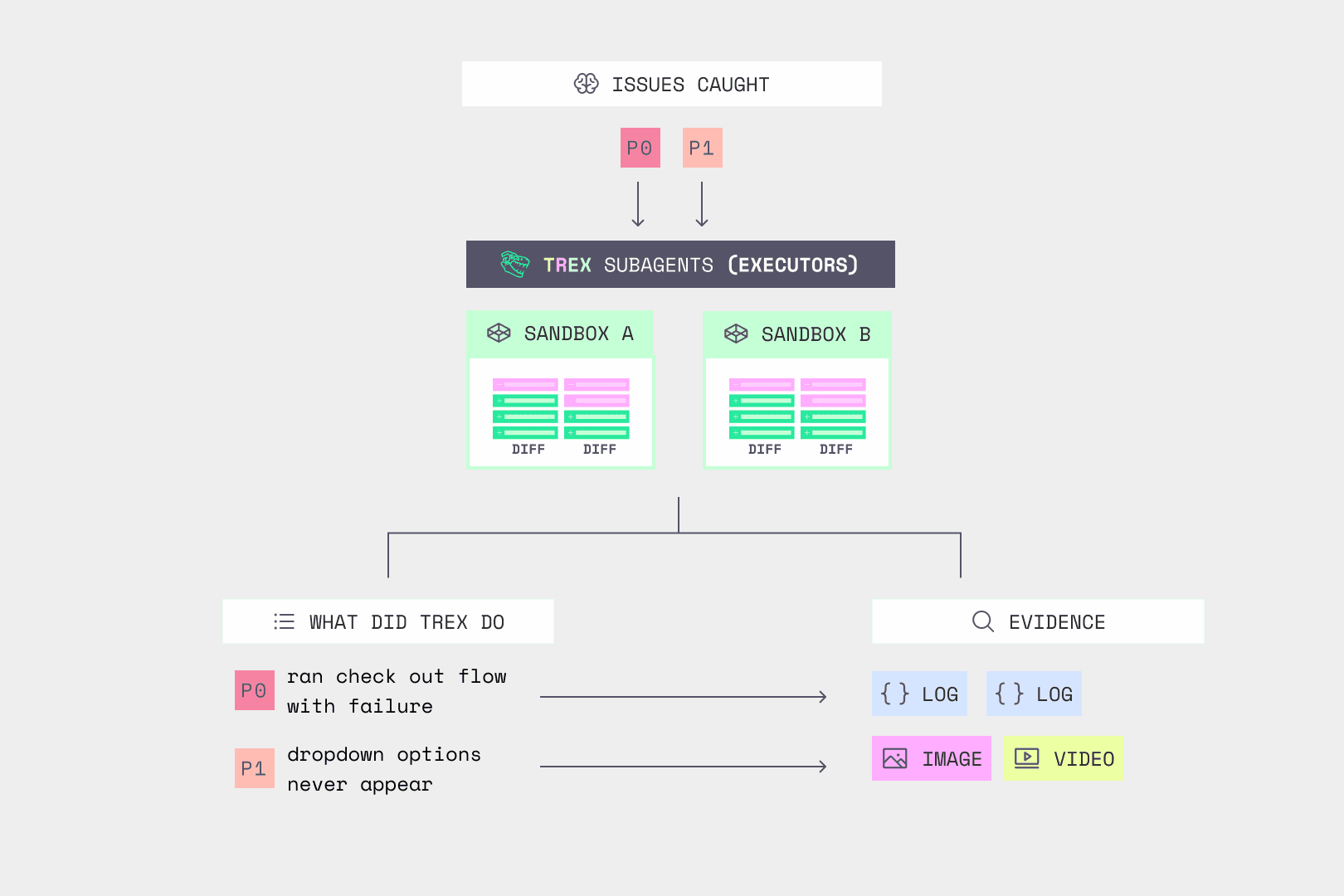
- The system spins up a secure, isolated environment (the "sandbox"). With Greptile's TREX, this happens at the pull request stage. The Greptile agent reviews the PR, picks out the behavior worth running, and spins up a TREX agent. TREX looks at the PR, your repo, your test suite, and your stack to figure out what needs to run, then starts a disposable sandbox (an isolated compute instance) in milliseconds.
- Code runs in the sandbox. This can happen manually (a developer runs it), automatically (your CI/CD pipeline or test suite runs it), or through agents working on their own. TREX installs your dependencies, starts the services the change touches, and exercises the code with targeted tests. That means real projects, not just unit tests against a mock: actual services with actual dependencies.
- Everything stays contained. The sandbox is the boundary for the entire run. Code runs isolated from your real machine, so errors, security flaws, and bugs stay inside it. Network access is a separate boundary: restrict outbound traffic and keep production credentials out of the sandbox, so a test can't call or change a live system.
- Results are logged and reported back to you. As code and tests run, changes, errors, and results are recorded, so a developer can see exactly what happened and what needs to change before the code goes to production.
With TREX, those results include logs, screenshots, API traces, execution scripts, and even video. If you push an animation change, TREX captures a video of it playing, so you can see exactly what it looks like without opening a local environment. If TREX finds a bug, it becomes a comment on the PR with the evidence attached. If everything works, that goes in the review summary as proof the change was actually tested. Other sandbox tools report results in their own ways.
What is a sandbox environment used for in software development?
Sandboxing has dozens of uses, depending on your team size, development process, and codebase. The real question is: when should your team use a sandbox?
Here are the key use cases at a glance:
| Use case | Why it matters | When to use it | Who it's for |
|---|---|---|---|
| Feature testing | Test new features in isolation to make sure they work before merging into prod | During development, QA, or at the PR stage | Everyone |
| Finding bugs | Many bugs only appear end to end, so you can't find them in the diff. Sandboxes let you validate behavior at runtime in a real, closed environment | During development or at the PR stage | Everyone, especially large teams with complex codebases |
| Experimenting | Try configurations, solutions, or prototypes in a real environment without affecting live code | During development, early testing, or feasibility research | Developers and engineers |
| Security testing | Find vulnerabilities inside a sandbox with fake data before real user data is exposed to the code | During development or at the PR stage | Everyone, especially high-risk code |
| Third-party and API integrations | Check compatibility and security of third-party code before it touches your real codebase | Before integrating third-party or open-source code | Everyone |
| AI coding environments | Agents can write, run, and test code without touching local machines or live environments | Throughout the agentic development lifecycle | Anyone using agentic coding workflows |
| Multi-agent workflows | Agents can work together in shared sandboxes without affecting live code | Throughout the agentic development lifecycle | Coding agents, review agents, and other agents |
In short, sandboxing has three main use cases: development, testing, and agentic coding. Let's look at each.
Using sandboxes for software development
Use a sandbox for development any time you need a dedicated space to explore and try out solutions without touching live code. That includes:
- Feasibility testing
- Building and iterating quickly on new features
- Experimental coding
- Comparing several approaches side by side
- Trying quick fixes
If you need a fast, disposable way to try lots of options, a sandbox is a great fit. You can write and run code quickly, see how each option behaves against a copy of your real environment, and then decide how to proceed.
Using sandboxes for testing
A sandbox test environment is one of the most common uses for sandboxing, and arguably the most important. Sandboxes give you a disposable, controlled environment that can closely mimic your live one. You can spin up as many as you need to test (and re-test) new code and see how changes behave end to end at runtime, without touching your live systems.
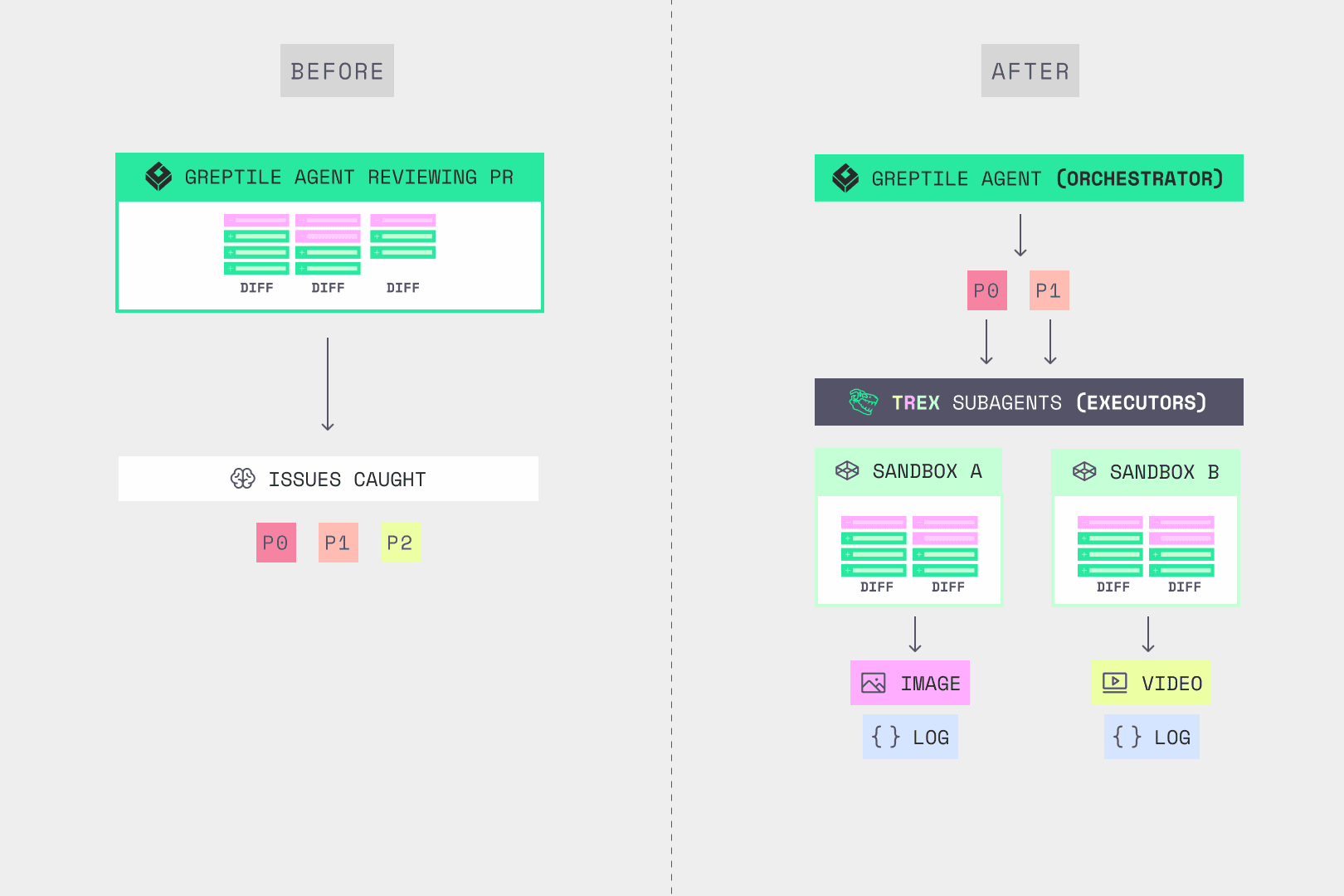
With Greptile, sandbox testing is part of the PR review itself. The Greptile agent orchestrates the review, and TREX does the testing. The Greptile agent reads the diff, identifies the issues worth investigating, and spins up a dedicated TREX agent and sandbox for each one, all running in parallel.
Each TREX agent inherits what the Greptile agent already knows about the change and your codebase, but works inside its own contained sandbox. Say you have a UI feature hidden behind an auth gate. Testing it locally means setting up the environment, handling authentication, and getting the feature flag into the right state. A TREX agent works through all of that on its own and comes back with a screenshot of the rendered feature, plus the logs and steps it took to get there.
Using sandboxes for agentic coding
Agentic coding is becoming the norm, and agents need tighter constraints than human developers do. That's where sandboxes come in.
A sandbox is a natural place for autonomous agents to work, and to work together. Coding agents can write, run, and test code in an environment that behaves like your live one, without production credentials or access to your live systems. Agents get the context they need to write better code, without access to anything they shouldn't touch.
The isolation is enforced below the agent, at the operating system level. At Greptile, the review agent runs in a locked-down rootless container, so the kernel guarantees it only sees the files it's supposed to. We walk through how that works in Sandboxing agents at the kernel level.
Agents can also work together in sandboxes: a coding agent writes code, a review or testing agent runs it and reviews it, and they iterate until the PR is clean. Mistakes, errors, and hallucinations stay isolated until a human reviews the result, so you can give agents more autonomy without adding risk to your codebase.
Benefits of using sandbox testing
Sandbox testing has always been useful in software development. It lets you:
- Isolate new code during development and testing to protect production
- Experiment faster and more freely in a controlled environment
- Catch runtime errors and bugs before production
- Test third-party code, files, or software without exposing your main network
With agents writing more of the code, it matters more than ever. Everyone says that about everything right now, but here it's true, for two reasons.
Sandboxing acts as a guardrail for agents
As teams bring agentic coding into their process, agents add velocity and they add risk. Part of the reason is that AI coding agents make different mistakes than humans do, which makes their bugs harder to catch.
When Greptile compared PRs written by several coding agents against human-written PRs, each agent had its own failure pattern. One introduced n+1 queries at 3.45× the human rate. Another clustered around configuration bugs and secrets in logs. A third ran highest on missing tenant checks (IDOR), off-by-one errors, and XSS.
These errors are easy to miss without careful review, so many of them reach prod and stay there. Liu et al. built a dataset of AI-authored commits across 6,299 GitHub repos and tracked each issue those commits introduced. 22.7% of the AI-introduced issues still survived in the latest version of the repository [1].
One way to reduce that risk: give agents a sandbox to work in instead of your actual environment.
A sandbox gives agents a constrained place to work, with enough agency, autonomy, and context to be useful, without too much control or access. That balance matters:
- If agents have no access to or context about your codebase, they can't write code that fits it, test it, or iterate on it.
- If agents have unrestricted access to your code and infrastructure, things can go wrong fast: dropped databases, insecure APIs, and bugs and security holes that reach prod without anyone noticing.
Sandboxing lets your agents work in an environment that behaves like production. With network access restricted and production secrets kept out, they can't affect production until a human approves the change.
Sandbox testing catches the bugs a diff can't show
Many bugs only show up end to end, at runtime: logic errors that need a specific sequence of state, broken business flows, and code that depends on behavior spread across many files. The bigger and more complex your codebase, the more of these bugs you'll have.
Agentic coding makes them more likely. Agents often write code that looks right but behaves wrong, or that breaks on edge cases.
Sandbox testing with a tool like TREX runs each change in an isolated environment so you can see how your code actually behaves end to end. The sandbox lets you run real code without risk to your main systems, and it lets you run more tests, faster.
When TREX reports that a page rendered with a broken layout, you know the code actually ran in a real environment. That's a different claim than, "The code looks like it might render with a broken layout."
Here are a few bugs TREX caught recently in real open-source repos:
- Auth bypass: Permission-stamp cache crosses tenant boundaries (elsa-workflows/elsa-core)
- Resource limit: Non-LCAE evidence bypasses the cap (celestiaorg/celestia-core)
- Security: Public-suffix cookie scope crosses tenant boundaries (hoppscotch/hoppscotch)
You can see more on the examples page.
How to create a sandbox environment
So how do you actually set one up? The traditional way looks something like this:
- Install a virtual machine or container platform. Use a hypervisor or containerization software (for example, VirtualBox or Docker) to create and manage the environment for your sandbox.
- Configure the machine. Allocate resources (CPU cores, RAM, and so on), install the OS, and configure network settings.
- Configure the sandbox itself. Inside the VM or container, install the software and dependencies you need, isolate network connections, and set the boundaries, permissions, and guardrails that keep the sandbox separate from the rest of your machine.
- Take a clean baseline snapshot. Create a save point you can return to after each test run.
- Write the test. Prepare a test that runs the code end to end. That means identifying every dependency, file, library, and package your code touches and making them available inside the sandbox. You'll also need to set up inputs, arguments, environment variables, and mock data so the test is clean and not flaky.
Then you run the test and analyze the results. When you're done, reset the sandbox to the baseline and reuse it for the next test.
If your goal is runtime validation of pull requests, there's a much simpler route: with a tool like Greptile's TREX, you describe your environment once and TREX handles the rest of these steps on every run, then you review the results. Here's how TREX compares to the traditional process:
| Traditional sandboxing | Greptile's TREX |
|---|---|
| Install a virtual machine | TREX runs as part of Greptile's code review, on Greptile's compute. There's no VM or container platform to install. |
| Configure the machine | Set up once per repository: a setup script, environment variables, and network access tell TREX how to build and start your services. After that, TREX spins up a fresh sandbox for each run. |
| Configure the sandbox, permissions, and isolation | Isolation is handled for you, and network access is a setting: turn internet access off or allow only the domains you list. Because TREX shares the review context, it already knows what the change does and where to look. |
| Take a baseline snapshot | Handled for you. TREX uses reusable base images and per-repository snapshots to speed up setup. Each run still fetches the exact PR commits and rotates credentials before execution begins. |
| Write the test | TREX writes targeted tests for the behavior the Greptile agent flags, using the dependencies, frameworks, and test setup your repo already uses. |
| Run the test | TREX installs dependencies, starts the services the change touches, and runs the tests, capturing logs, screenshots, traces, scripts, and video along the way. Test an animation change and you get a video of it playing. Test a checkout flow and you get the execution script for each step. |
| Analyze results and repeat | This is where you come in. Bugs show up as PR comments with the evidence attached. You can fix them yourself, or hand them to your coding agent and loop until the PR reaches a 5/5 confidence score. |
How Greptile's TREX helps engineering teams catch more bugs
With agents writing more code, bigger teams, and messier codebases, diff-only code review isn't enough.
If you're not running the code changes that ask to be merged, especially on large teams working in complex codebases, you're missing bugs that ship to prod. That gets more obvious as code generation speeds up:
- Georgia Tech's Vibe Security Radar tracks vulnerabilities introduced by AI-generated code. It found about 18 cases across the second half of 2025, when tracking began. In March 2026 alone, it found 35, nearly double its entire 2025 count [2].
- He et al. studied 806 GitHub repos after they adopted an AI coding editor. Velocity gains faded within two months, but code complexity (+41%) and static analysis warnings (+30%) rose at adoption and stayed elevated for the full observation period [3].
In Greptile's evals, review with TREX catches 20% more bugs than review alone. Those are the bugs that only show up when the code runs.
As your team grows and agents write more of the code, you end up with a codebase no one knows end to end. You need a reviewer that catches what your engineers miss and checks each PR against everything it touches, not just what's in the diff. Here's how Greptile does that:
- Greptile maps your codebase at onboarding and keeps a knowledge base of how each part works and how it connects to everything else. It can trace what calls what and where a change actually lands.
- TREX runs the change in a disposable sandbox. Every TREX run gets an isolated compute instance, started fresh in milliseconds and thrown away when the run is done. It runs against your real services and dependencies, not a generic mock environment.
- TREX attaches the evidence. Screenshots, video, logs, traces, and scripts show what broke and where, so you or your coding agent can confirm the result instead of taking it on faith.
- TREX runs on a model-agnostic harness. The Greptile agent and its TREX subagents can use different model providers within the same review. That matters because models are worse at reviewing their own code, and because the tool that reviews your code should be independent of the one that wrote it.
Unlike traditional sandboxing, all of this happens automatically at the pull request stage. Review and testing keep pace with code generation, every change is checked with full context of your codebase, and your developers get the evidence they need to fix what broke.
TREX with Computer Use
TREX now also comes with Computer Use, a major step forward for sandbox testing. TREX spins up the relevant services for your change and uses computer use to test them end to end. It can test desktop apps, open a browser and click through a web app to simulate user flows, or use a terminal to test your CLI, all inside the sandbox.
Good engineers know that testing the happy path isn't enough, so TREX tests possible edge cases in the user flow in parallel.
How Computer Use works
Say you have a PR that adds CLI OAuth through your web app.
- TREX spins up a terminal and a browser at the same time to test the entire flow end to end.
- It runs the login command in its terminal, which redirects to the login page.
- It enters its credentials in the browser, which redirects back to the terminal.
- In parallel, it tests the case where the browser fails to connect to the CLI automatically and the user has to copy the authentication code.
- It pastes the code into the terminal and discovers that the copied URL includes newlines, so the login fails.
That's a bug, and one you'd never see by reading the diff.
TREX with Computer Use is available now in beta.
Teams that rely on Greptile to catch what the diff hides
Engineering teams at large companies use Greptile to catch bugs in complex codebases:
- Podium reviews 8,400+ code changes a week with Greptile, which has caught issues like a critical configuration problem that would have caused deployment failures.
- NVIDIA has reviewed 395,000+ pull requests with Greptile. NVIDIA engineers say it reads across the entire codebase and flags bugs up front that would otherwise show up later.
- Mixpanel had an infra PR whose description said the change had no blast radius to other services. Greptile found otherwise.
“Greptile teased out that that wasn't true, that this was transitively changing the behavior of some downstream service. I was able to determine that despite the clues being nowhere in the diff at all.
”
Ready to use sandboxing to catch more bugs and give your agents room to work safely? Try Greptile with TREX and see what running every change does for your codebase. Greptile comes with a 14-day free trial, no credit card required.
Footnotes
[1] Liu, Y., Widyasari, R., Zhao, Y., Irsan, I.C., Chen, J., and Lo, D. "Debt Behind the AI Boom: A Large-Scale Empirical Study of AI-Generated Code in the Wild." arXiv:2603.28592, March 2026. arxiv.org/abs/2603.28592
[2] Georgia Tech School of Cybersecurity and Privacy. "Bad Vibes: AI-Generated Code is Vulnerable, Researchers Warn." Georgia Tech Research News Center, April 2026. research.gatech.edu/bad-vibes-ai-generated-code-vulnerable-researchers-warn
[3] He, H., Miller, C., Agarwal, S., Kästner, C., and Vasilescu, B. "Speed at the Cost of Quality: How Cursor AI Increases Short-Term Velocity and Long-Term Complexity in Open-Source Projects." Mining Software Repositories (MSR '26), April 2026. cmustrudel.github.io/papers/msr2026he.pdf