
Prerequisites: Authorizing the connection to Jira requires admin access. Once authorized, the context applies to every repository in the organization.
What Greptile Does with Your Tickets
- Greptile finds the ticket. It reads issue keys and links from the pull request title, description, and branch name, and it can search Jira and Confluence for related work.
- Greptile reviews the code against the ticket. The description and acceptance criteria become review context, so Greptile can point out where a change does not do what the ticket asked for.
- Greptile answers follow-up questions. Ask about a Jira ticket in a reply to a Greptile comment, and Greptile looks it up.
- Greptile shows what it read. A ticket or page that a comment relies on is linked in that comment.
Connect Jira
1
Open Integrations
Go to Memory → Integrations in the Greptile dashboard.
2
Add Atlassian
Click Add new data source and select Atlassian.
3
Authorize Greptile
Atlassian asks you to grant Greptile read access. Choose the site you want to use it on, then click Accept.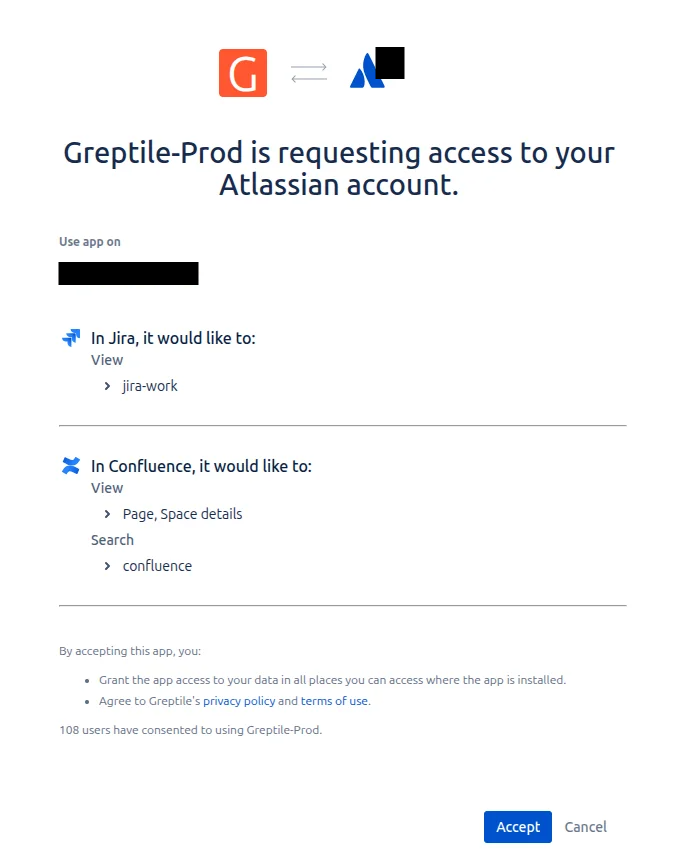
4
Confirm the connection
Atlassian now appears in your list of connected data sources. Greptile can use Jira and Confluence context on the next review.
Existing Atlassian connections already cover Confluence, so you do not need to reconnect for Greptile to read pages. If your site has no Confluence, reviews continue with Jira alone.
Where Tickets and Pages Appear in Reviews
A comment that depends on a ticket or page ends with a Source Used: line linking to it. If your organization has Greptile update the pull request description, the description also carries a Context used list of the tickets and pages the summary drew on. Jira tickets and Confluence pages are both labeled Atlassian there, after the connection they come from. Greptile cites only the tickets and pages it actually opened.What Greptile Can Read
The connection is read-only, so Greptile never writes to Jira or Confluence. Greptile reads Jira and Confluence as the Atlassian account that authorized the connection, which means it sees any ticket or page that account can see. Greptile reads one Atlassian site: the site you chose when you authorized the connection. Email support@greptile.com if you need to point it at a different one.Manage the Connection
Any member of your organization can see the connected data sources under Memory → Integrations, and admins can add or remove them there. To turn the integration off, click the disconnect icon on the Atlassian row and confirm. Greptile deletes the stored credentials, and reviews continue without ticket or page context.Next Steps
Linear Integration
Connect Linear to give reviews the same kind of issue context.
Common Issues
Troubleshoot reviews that are not picking up ticket context.